
Raw reports contain the data associated to each click you have sent through KelkooGroup.
Request
Endpoint
/raw
Authentication
See JWT details.
Filters
The following filters are available as query parameters to the request, these are the same as those found in the aggregated reports:
|
Parameter name |
Type |
Mandatory |
Description |
Example |
|---|---|---|---|---|
|
|
date |
No |
Start day (inclusive) of the period to retrieve data for (required |
|
|
|
date |
No |
End day (inclusive) of the period to retrieve data for (required |
|
|
|
string |
No |
Filters data on a specific country, by default all countries are included |
|
|
|
string (1) |
No |
Specify the number of days to retrieve data for (excluded |
|
|
|
string (2) |
No |
Filters data on a specific user device, by default all devices are included |
|
|
|
string |
No |
Filters data on a specific service type, by default all services are included |
|
|
|
string |
No |
Filters data on a specific token id, by default all of the application's tokens are included |
|
|
|
boolean |
No |
Filters leads that only have sales tracking enabled (or only disabled) |
|
|
|
string |
No |
Filters data on a specific publisher sub id, by default all data are included |
|
|
|
string |
No |
Filters data on a specific publisher sub name, by default all data are included |
|
|
|
string |
No |
Filters data on a specific publisher traffic type, by default all data are included |
|
|
|
boolean |
No |
Filters data on robotic traffic or not, by default all data are included |
|
(1): value of dateRange MUST be one of : yesterday, last7days, last30days (2): value of userDevice MUST be one of : desktop, mobile, tablet
Columns sets
One can choose the sets of columns he wants in the report by specifying the columnsSet parameter.
-
Parameter format is :
columnsSet=set1,set2, eg. :columnsSet=basic,performance -
If not set, all columns will be returned by default.
-
Basic set is always returned with any other column set. Even if it is not specified.
You'll find the list of availables columns set in the table below and the details of columns in the Report section below
|
columns set name |
columns belonging to set |
|---|---|
|
basic |
clickId, country, day, service, clickValid, leadValid, sale, merchantId, merchantName, merchantTier |
|
performance |
month, userDevice, clickInvalidType, leadEstimatedRevenue, leadEstimatedRevenueInEur, leadEstimatedRevenueInGbp, leadEstimatedRevenueInUsd |
|
conversion |
salesTracked, saleValue, saleValueInEur, saleValueInGbp, saleValueInUsd, saleCount |
|
technical |
dateTime, publisherApplicationId, publisherApplicationName, publisherTokenId, publisherTokenName, leadId |
|
publisher |
originReferer, publisherClickId, publisherSubId, publisherSubName, publisherTrafficType, custom1, custom2, custom3 |
|
traffic |
userOperatingSystem, userOperatingSystemVersion, userBrowser, userBrowserVersion, userAgent, userRequestReferrer, clickInvalidReason, trafficAnalysisIsBot, trafficAnalysisBotName, trafficAnalysisBotMatchedRules, trafficAnalysisBotConfidenceScore, trafficAnalysisIsFraudulent, isIframe, leadInvalidType, leadInvalidReason |
|
links |
link, linkPublisherPage, linkUrlTarget |
|
offer |
offer, offerId, offerTitle, offerEan, offerCategoryId, offerCategoryName, offerBrandId, offerBrandName |
Response format
Response format can be chosen using the Accept HTTP header in your request.
Possible value:
-
TSV:
text/tab-separated-values(default) -
JSON:
application/json
Report
(response)
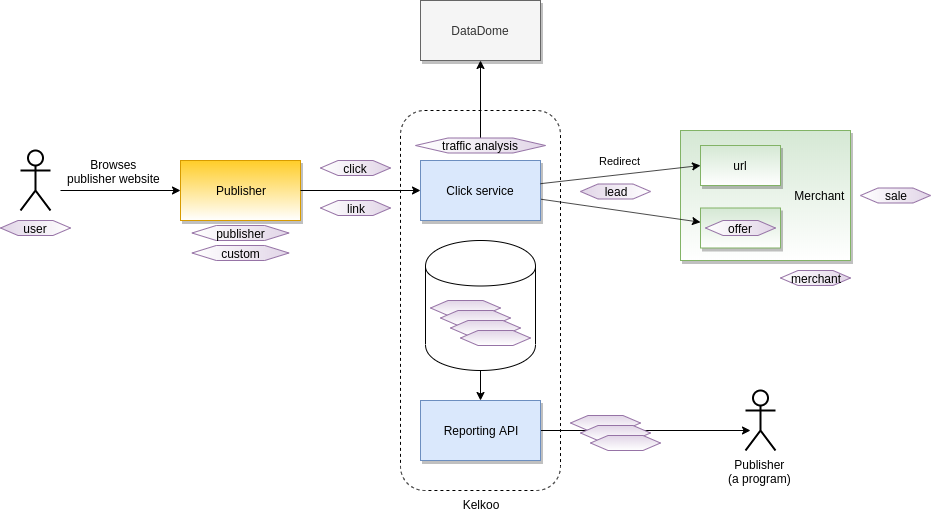
This report is not aggregated, each line represent a click done by a user with information about
-
the user who has done the click
-
the publisher who has provided the go url or the link
-
the click itself
-
the traffic analysis conclusions provided by DataDome
and optionally information about
-
the custom parameters, if the publisher has provided some
-
the link, if the publisher has used * links* service
-
the lead, if the user has been redirected to the merchant
-
the offer, if the user has been redirected to a specific merchant offer
-
the merchant, if the user has been redirected to the merchant
-
the sale, if the user has bought an item in the merchant site thanks to this lead
General fields
|
Field |
Type |
Optional |
Value |
Description |
|---|---|---|---|---|
|
|
string |
false |
Domain: { |
Country |
|
|
string |
false |
Example: |
Date and time of the click |
|
|
string |
false |
Example: |
Day of the click |
|
|
string |
false |
Example: |
Month of the click |
|
|
string |
false |
Domain: { |
Service used by the publisher to generated the go url or the link |
See the different services.
User related fields
What is the context of the user, when he has done the click.
|
Field |
Type |
Optional |
Value |
Description |
|---|---|---|---|---|
|
|
string |
false(*) |
Domain: { |
Device type |
|
|
string |
false(*) |
Examples: { |
Operating system |
|
|
string |
false(*) |
Examples: { |
Operating system version |
|
|
string |
false(*) |
Examples: { |
Browser |
|
|
string |
false(*) |
Examples: { |
Browser version |
|
|
string |
false(*) |
Example: see below |
User agent |
|
|
string |
false(*) |
|
Url origin of the click |
(*) In some corner cases, when a bot is involved,
-
the
userAgentis not provided in the request and we cannot extract the device, operating system or browser -
the user request
referreris erased
Example of userAgent: Mozilla/5.0 (Windows NT 10.0; Win64; x64) AppleWebKit/537.36 (KHTML, like Gecko) Chrome/100.0.4896.127 Safari/537.36
Publisher related fields
How you, the publisher , authenticate to service, when he has generated the go url or the link.
|
Field |
Type |
Optional |
Description |
|---|---|---|---|
|
|
number |
false |
KelkooGroup application identifier |
|
|
string |
false |
KelkooGroup application name |
|
|
string |
false |
KelkooGroup token identifier |
|
|
string |
false |
KelkooGroup token name |
Publisher parameters
Which publisher parameters, the publisher has provided when he has generated the go url or the link.
|
Field |
Type |
Optional |
Description |
|---|---|---|---|
|
|
string |
true |
Origin referrer |
|
|
string |
true |
Custom click ID |
|
|
string |
true |
Subnetwork ID |
|
|
string |
true |
Subnetwork name |
|
|
string |
true |
Custom traffic type |
|
|
string |
true |
Custom attribute 1 |
|
|
string |
true |
Custom attribute 2 |
|
|
string |
true |
Custom attribute 3 |
Link related fields
If the user has used a link, what was its context.
|
Field |
Type |
Optional |
Description |
|---|---|---|---|
|
|
boolean |
false |
True if the goUrl is a Link |
|
|
string |
true |
Page URL from which the link was clicked |
|
|
string |
true |
Destination URL used in the link |
Click related fields
Is the click valid? If not, why.
|
Field |
Type |
Optional |
Value |
Description |
|---|---|---|---|---|
|
|
string |
false |
Example: |
KelkooGroup click identifier |
|
|
boolean |
false |
|
True if the click is valid |
|
|
string |
true |
Domain: { |
Type of invalid click if applicable |
|
|
string |
true |
Example: |
Reason of invalid click if applicable |
Traffic analysis fields
Details on the traffic analysis. The aim is to detect robotic traffic. This traffic analysis is handled by DataDome, a third party company.
|
Field |
Type |
Optional |
Value |
Description |
|---|---|---|---|---|
|
|
boolean |
false |
|
True if the click is coming from a bot |
|
|
string |
true |
Examples: see below |
Bot name if applicable |
|
|
list of strings |
true |
|
Rules that flagged the click as coming from a bot |
|
|
number |
true |
Domain: between |
Confidence score for flagging click as coming from a bot |
|
|
boolean |
true |
|
True if the click is fraudulent |
trafficAnalysisBotName examples:
Signature-Based detection
-
DataDome - Scraping (signature detection) : Scrapers detected because they have an inconsistent browser fingerprint.
-
DataDome - Bot Threat Activity (signature detection) : Bots with an inconsistent/suspicious signature/browser fingerprint.
-
DataDome - Inconsistent Client Hint HTTP Headers : Bot signature with an inconsistency between the user-agent claimed and the present of some client hints headers (sec-ch-* headers).
-
DataDome - Inconsistent Accept Header : Bot signature with an inconsistency between the user agent and the value of the Accept header.
-
DataDome - Inconsistent Fetch Metadata : Bot signature with an inconsistency between the user agent and the value/presence of some fetch metadata headers.
-
DataDome - Not Chrome But Signed Exchange : Presence of signed exchange in the accept header on a non-chrome browser.
-
DataDome - Old Chrome Signed Exchange : Bots that pretends to be a old Chrome in its user-agent but send a signed exchange value in accept header.
-
DataDome - UserAgent Library : Bots using the popular UserAgent Library.
-
DataDome - Automated Browser : Bot signature with signals/side effects linked to automated (headless) browsers like selenium/puppeteer or any other automation framework.
-
DataDome - Fake Browsers and Fake Browser Login : Bots that modified their user-agent as well as other HTTP headers to appear human/like a legitimate human browser.
-
DataDome - Fake Chrome browser : Inconsistency between the user agent that claims to be Chrome and other attributes observed.
-
DataDome - Selenium : Bot signature with signals/side effects related to selenium.
-
DataDome - fake browser supports Brotli : Inconsistency between the user agent and the fact that the browser claims to support (or not) brotli encoding in the accept-encoding header.
-
DataDome - UserAgent Crawler : Bots using the popular UserAgent Crawler.
-
DataDome - Inconsistent HTTP headers : Bots that improperly forged their HTTP headers.
-
DataDome - Headless Browser Forged Fingerprint : Headless browsers (Chrome/Firefox/Safari) instrumented with frameworks such as Puppeteer/Selenium/Playwright that modified their browser fingerprint to try to appear human.
-
DataDome - UserAgent Browser Automation : Bots using the popular UserAgent Browser Automation.
-
DataDome - Puppeteer Extra Stealth : Bots based on (Headless) Chrome and instrumented with the Puppeteer Extra Stealth plugin.
-
DataDome - Global CDP And Obfuscated Browsers Hard-block : Bots based on Chromium using Chrome Devtools Protocol.
-
DataDome - UserAgent linux command : Bots using the popular UserAgent Library.
-
DataDome - saasCrawlers : Bot signature that are linked to Scraping SaaS/ Bot as a service.
-
DataDome - Global CDP And Obfuscated Browsers Hard-block and DataDome - CDP API Automation - IP : Bots using the Chrome devtools protocol. It is used to automated Chromium based browser, e.g. with puppeteer, playwright or selenium. It also detects people with devtools open.
-
DataDome - Automated Chrome Browser CDP detection CAPTCHA session : Similar to “CDP API Automation - IP” but this time we only block the session and not the whole IP address.
-
DataDome - Outdated user-agent bad autonomous system : Outdated user-agent operating from an autonomous system with a bad reputation.
-
DataDome - Inconsistent client-side behavior : Bots with inconsistent/abnormal user behavior based on signals collected on the client side (JS).
Behavioral detection
-
DataDome - Bot Threat Activity (behavioral detection) : Generic behavioral bot pattern. It means the IP address got blocked because of an abnormal behavior.
-
DataDome - Temporal pattern AI : ML model that analyze behavioral patterns and automatically generate signatures/fingerprints to block traffic with abnormal behavioral pattern.
Reputational detection
-
DataDome - Bad IP reputation (data center IPs) : Bots that operate from data center IPs that were recently flagged as malicious by DataDome’s detection engine.
-
DataDome - Bad IP reputation : Bots that operate from IP addresses with a bad reputation.
-
DataDome - Residential proxies : Bots that route their traffic through residential proxies.
-
DataDome - Free proxies IPs : Bots that route their traffic through free proxies (proxies freely listed on the Internet)
-
DataDome - Shared data center proxies : Bots that route their traffic through IPs that have been identified as data center proxies.
-
DataDome - Private residential proxies IP ranges hard-block : IP range identified as being used only as proxies by bots
-
DataDome - Brightdata data-center IP ranges hard-block: Data center IP range linked to the Brightdata service
-
...
You can have more details on those rules in DataDome documentation site:
Lead related fields
Has the user arrived at the merchant site.
-
If yes, the lead is considered valid?
-
If not, why?
How much you, the publisher, can estimate its revenue for this lead?
|
Field |
Type |
Optional |
Value |
Description |
|---|---|---|---|---|
|
|
boolean |
false |
|
True if the lead is valid |
|
|
string |
true |
|
KelkooGroup lead identifier if applicable |
|
|
string |
true |
Domain: { |
Type of invalid lead if applicable |
|
|
string |
true |
Examples: see below |
Reason of invalid lead if applicable |
|
|
number |
true |
Example: |
Estimated revenue (local currency) if applicable |
|
|
number |
true |
Example: |
Estimated revenue (EUR) if applicable |
|
|
number |
true |
Example: |
Estimated revenue (GBP) if applicable |
|
|
number |
true |
Example: |
Estimated revenue (USD) if applicable |
Other leadInvalidReason values
Below are a range of values in addition to the DataDome ones listed above that may result in an invalid lead.
-
End user clicked on go URLs of the same merchant -
End user was not redirected to the merchant -
End user was not redirected to the merchant because the Go URL was called in background -
End user was not redirected to the merchant because the browser javascript is disabled -
DataDome - Bad IP reputation (data center IPs) -
...
End user was not redirected to the merchant is a value that can have multiple possible causes, but most commonly comes about as a result of the Kelkoo redirect being triggered from within an iFrame. Alternatively, this can occur when JS is disabled in the browser. Please ensure that you follow the guide outlined in the quickstart guides about how to handle Kelkoo redirect (Go) URLs.
Offer related fields
Is the user led to a merchant offer? What is this offer.
|
Field |
Type |
Optional |
Value |
Description |
|---|---|---|---|---|
|
|
boolean |
false |
|
True if the click is a click on an offer (including Links with offer match) |
|
|
string |
true |
Example: |
KelkooGroup offer identifier |
|
|
string |
true |
Example: |
Offer title |
|
|
string |
true |
Example: |
Offer EAN |
|
|
number |
true |
Example: |
KelkooGroup category identifier of the offer |
|
|
string |
true |
Example: |
KelkooGroup category name of the offer |
|
|
number |
true |
Example: |
KelkooGroup brand identifier of the offer |
|
|
string |
true |
Example: |
KelkooGroup brand name of the offer |
Merchant related fields
Is the user led to a merchant? What is this merchant.
|
Field |
Type |
Optional |
Value |
Description |
|---|---|---|---|---|
|
|
number |
true |
Example: |
KelkooGroup merchant identifier associated to the click |
|
|
number |
true |
Example: |
KelkooGroup unique identifier for the merchant domain |
|
|
string |
true |
Example: |
KelkooGroup merchant name associated to the click |
|
|
string |
true |
Domain: { |
KelkooGroup merchant tier associated to the click. See details. |
|
|
string |
true |
Example: |
Merchant domain |
Sale related fields
Has the merchant done a sale with the user? What is this sale.
|
Field |
Type |
Optional |
Value |
Description |
|---|---|---|---|---|
|
|
boolean |
false |
|
True if the click was performed on a merchant that has sales tracking enabled |
|
|
boolean |
false |
|
True if the click generated a sale |
|
|
number |
true |
Example: |
Value of the sale (local currency) if applicable |
|
|
number |
true |
Example: |
Value of the sale (EUR) if applicable |
|
|
number |
true |
Example: |
Value of the sale (GBP) if applicable |
|
|
number |
true |
Example: |
Value of the sale (USD) if applicable |
|
|
number |
true |
Example: |
Number of sales if applicable |
Extracts
This report provide the more granular data on the user journey. From those data we can apply some filters to extract specific sub reports. It can be done by a script or Excel on publisher side.
Not matching clicks
The user click on a go url or a link but never arrive to the merchant because the resource initially referred in KelkooGroup system didn't exist anymore.
Apply the filters:
-
clickValid==false -
clickInvalidType==No match
Select the meaningfully fields in this context:
-
clickInvalidReason: some more details on the invalid reason. -
service: depending on the service used, some optimization can be applied. -
merchantId,merchantName: which merchant was initially targeted. -
offerId: which offer was initially targeted if the publisher was using the service Search or Feeds. -
linkUrlTarget: which url was initially targeted if the publisher was using the service Links. -
custom1,custom2,custom3: give some context on the publisher side.
Examples
-
Given the Accept header is defined with value application/json
-
When I perform a GET with defined headers on following URL /api/public/raw?start=2022-01-10&end=2022-01-11
-
Then I get a response with status 200
-
And the result is the same as the following json
[
  {
    "clickId": "665352523_2107698149_4644214",
    "country": "fr",
    "dateTime": "2022-01-11T13:34:12.321Z",
    "day": "2022-01-11",
    "month": "2022-01",
    "service": "Links",
    "publisherApplicationId": 123,
    "publisherApplicationName": "Yollared-App",
    "publisherTokenId": "8992-4e6c-b456-525bbb2ca68e",
    "publisherTokenName": "Yollared-App-Token",
    "userDevice": "desktop",
    "userOperatingSystem": "Android",
    "userOperatingSystemVersion": "9.0",
    "userBrowser": "Firefox",
    "userBrowserVersion": "94.0",
    "userAgent": "Mozilla/5.0 (Linux; Android 9; SM-G950F Build/PPR1.180610.011; wv) AppleWebKit/537.36 (KHTML, like Gecko) Version/4.0 Chrome/100.0.4896.127 Mobile Safari/537.36",
    "userRequestReferrer": "https://api.cactous-search.com/out_xml?p=6262662cec51f50353251889f1",
    "originReferer": "www.publisher-origin.com",
    "publisherClickId": "1646813241",
    "publisherSubId": "59",
    "publisherSubName": "sub-59",
    "publisherTrafficType": "content",
    "custom1": "2df716ce5b49d7152940ece47ac2469aec1a",
    "custom2": "i0wrbXHkrzds",
    "custom3": "true",
    "clickValid": true,
    "trafficAnalysisIsBot": false,
    "trafficAnalysisIsFraudulent": false,
    "leadValid": true,
    "leadId": "165352523_2107698149_4644214",
    "leadEstimatedRevenue": 1.2,
    "leadEstimatedRevenueInEur": 1.2,
    "leadEstimatedRevenueInGbp": 1.0074238719715491,
    "leadEstimatedRevenueInUsd": 1.35972,
    "salesTracked": true,
    "sale": true,
    "saleValue": 10,
    "saleValueInEur": 15,
    "saleValueInGbp": 12.592798399644366,
    "saleValueInUsd": 16.9965,
    "saleCount": 1,
    "merchantId": 647,
    "merchantWebsiteId": 10647,
    "merchantName": "Polyestar",
    "merchantTier": "Flex Premium",
    "merchantDomain": "polyestar.fr",
    "link": true,
    "linkPublisherPage": "https://api.cactous-search.com/out_xml?p=6262662cec51f50353251889f1",
    "linkUrlTarget": "https://polyestar.com",
    "offer": false,
    "nonDomestic": false
  },
  {
    "clickId": "586252523_2107698149_6532744",
    "country": "fr",
    "dateTime": "2022-01-11T13:34:13.567Z",
    "day": "2022-01-11",
    "month": "2022-01",
    "service": "Search",
    "publisherApplicationId": 123,
    "publisherApplicationName": "Yollared-App",
    "publisherTokenId": "8992-4e6c-b456-525bbb2ca68e",
    "publisherTokenName": "Yollared-App-Token",
    "userDevice": "desktop",
    "userOperatingSystem": "Android",
    "userOperatingSystemVersion": "9.0",
    "userBrowser": "Firefox",
    "userBrowserVersion": "94.0",
    "userAgent": "BadBot",
    "publisherSubId": "99",
    "publisherSubName": "sub-99",
    "clickValid": true,
    "trafficAnalysisIsBot": true,
    "trafficAnalysisBotName": "Datadome - Headless Browser Forged Fingerprint",
    "trafficAnalysisBotMatchedRules": [
      "Headless Browser Forged Fingerprint",
      "Scraping (behavioral detection)",
      "Scraping (signature detection)"
    ],
    "trafficAnalysisBotConfidenceScore": 0.9,
    "trafficAnalysisIsFraudulent": true,
    "leadValid": false,
    "leadInvalidType": "Traffic Analysis",
    "leadInvalidReason": "Datadome - Headless Browser Forged Fingerprint",
    "leadId": "107698149_1653525235_4643534",
    "leadEstimatedRevenue": 0,
    "leadEstimatedRevenueInEur": 0,
    "leadEstimatedRevenueInGbp": 0,
    "leadEstimatedRevenueInUsd": 0,
    "salesTracked": false,
    "merchantId": 444,
    "merchantWebsiteId": 10444,
    "merchantName": "ToolPorter",
    "merchantTier": "Static",
    "merchantDomain": "tool-porter.fr",
    "link": false,
    "offer": true,
    "offerId": "1010101010",
    "offerTitle": "TOOLPORT Pop Up Gazebo 3x6m High Performance Polyester 350 g/m² dark grey waterproof",
    "offerEan": "4064108037722",
    "offerCategoryId": 138001,
    "offerCategoryName": "Outdoor Equipment",
    "offerBrandId": 647,
    "offerBrandName": "Gazebo",
    "nonDomestic": true
  },
  {
    "clickId": "231252523_2107698149_8759764",
    "country": "fr",
    "dateTime": "2022-01-11T13:34:13.567Z",
    "day": "2022-01-11",
    "month": "2022-01",
    "service": "Search",
    "publisherApplicationId": 123,
    "publisherApplicationName": "Yollared-App",
    "publisherTokenId": "8992-4e6c-b456-525bbb2ca68e",
    "publisherTokenName": "Yollared-App-Token",
    "userDevice": "desktop",
    "userOperatingSystem": "Android",
    "userOperatingSystemVersion": "9.0",
    "userBrowser": "Firefox",
    "userBrowserVersion": "94.0",
    "userAgent": "Mozilla/5.0 (Linux; Android 9; SM-G950F Build/PPR1.180610.011; wv) AppleWebKit/537.36 (KHTML, like Gecko) Version/4.0 Chrome/100.0.4896.127 Mobile Safari/537.36",
    "userRequestReferrer": "https://api.cactous-search.com/out_xml?p=6262662cec51f50353251889f1",
    "clickValid": true,
    "trafficAnalysisIsBot": false,
    "trafficAnalysisIsFraudulent": false,
    "leadValid": false,
    "leadInvalidType": "Traffic Analysis",
    "leadInvalidReason": "End user clicked on go URLs of the same merchant",
    "leadId": "107343449_1653525235_4643534",
    "leadEstimatedRevenue": 0,
    "leadEstimatedRevenueInEur": 0,
    "leadEstimatedRevenueInGbp": 0,
    "leadEstimatedRevenueInUsd": 0,
    "salesTracked": false,
    "merchantId": 444,
    "merchantWebsiteId": 10444,
    "merchantName": "ToolPorter",
    "merchantTier": "Static",
    "merchantDomain": "tool-porter.fr",
    "link": false,
    "offer": true,
    "offerId": "1010101010",
    "offerTitle": "TOOLPORT Pop Up Gazebo 3x6m High Performance Polyester 350 g/m² dark grey waterproof",
    "offerEan": "4064108037722",
    "offerCategoryId": 138001,
    "offerCategoryName": "Outdoor Equipment",
    "offerBrandId": 647,
    "offerBrandName": "Gazebo"
  }
]