Everytime I connect to my merchant center, I need to reset my password. What can I do ?
The most common reason is that your are not using a wrong login/password combination.
-
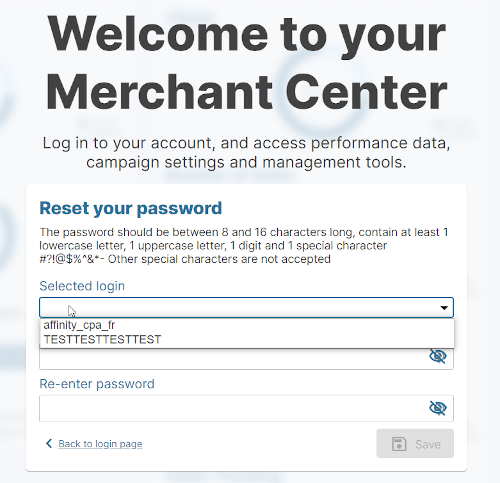
** As you can have multiple logins attached to the same email, it's important that you always select the correct login before entering your password.**
-
If you wish to get a single login for all your accounts, please contact your account manager.*
-
Another reason might be that you are using a password manager and that you don't update the password when you reset it.
How to reset your password
-
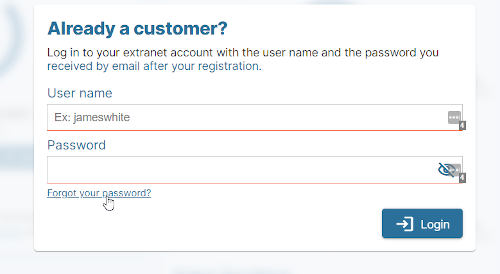
Click on Forgot your password on the login page
-
Enter the email address attached to your Kelkoo Group account
-
Click on Send me a link to reset my password
-
You should receive shortly an email in your inbox (from a *@kelkoogroup.com address). Please check your Spam folder if you don't receive anything.
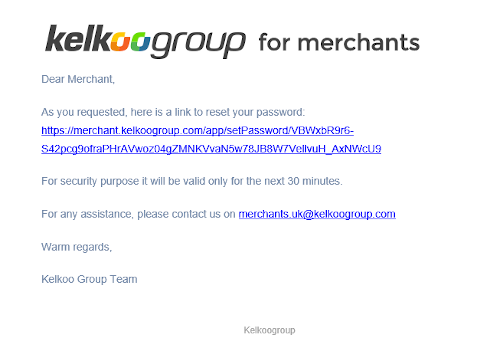
This email is only valid for 30 minutes and can only be used once. If you got an error when clicking on the link, please restart the procedure.
-
You are redirected to a page to reset your password
-
** IMPORTANT! As you can have multiple logins attached to your email, you need to select first the login for which you want to reset**
-
Enter a password that respect our format:
The password should be between 8 and 16 characters long, contain at least 1 lowercase letter, 1 uppercase letter, 1 digit and 1 special character #?!@$%^&*- Other special characters are not accepted. The dot is not accepted