
Important
-
Installation via Google Tag Manager (GTM) or Manual installation is the official implementation (see Installation Methods).
-
This Server-to-Server implementation is only intended as a fallback method to increase tracking coverage.
-
It is only available if you have an in-house development team managing. It is not suitable for agency/third party or if you don't have a technical team.
-
We don't provide custom implementation and a very limited technical support for this implementation.
-
You need to track inbound traffic directly from Kelkoo Group Network, as well as parallel tracking calls when the url contains gclid id from Google
-
You need to make sure all sales are tracked, in-session as well as those made on a different session than the initial click.
Global view
-
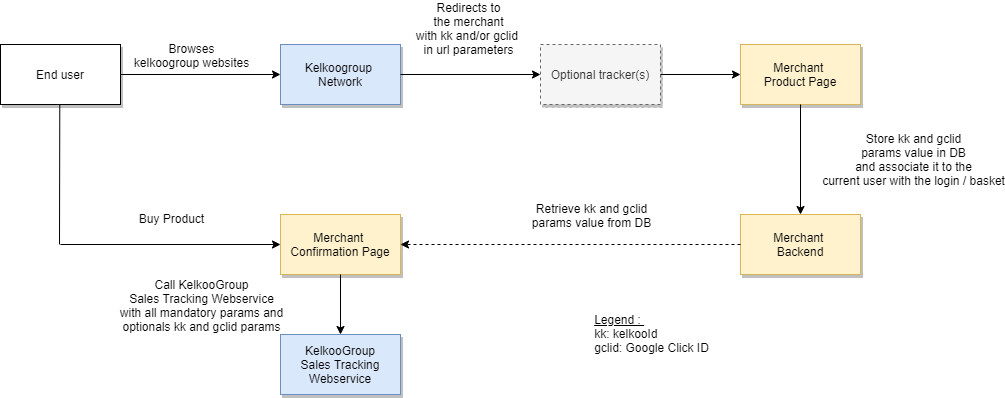
End user browses Kelkoo Group websites, when clicking an offer on Kelkoo Group Network, he is redirected to the merchant website.
-
KelkooId (kk) and Google Click Id (gclid) is passed as parameters of the url
-
When the user reaches one of your Product page, your website stores kk and gclid id in a table on your website's backend, and associate it to the current user via the login/basket
|
basket |
login |
kk |
gclid |
|---|---|---|---|
|
17e8b1bxx7r17420 |
1233443 |
a4csscc-1781b717420-34cf3 |
EAIaIQobChMIpNXu6r6D6AIVQsjeCh27SQXcEAkYAyABEgIhz_D_BwE |
|
... |
... |
... |
... |
-
When the user buys the product and reaches your Confirmation Page, your Website retrieves kk and gclid params value from database and calls the Kelkoo Group Sales Tracking Webservice on https://s.kelkoogroup.net/st for each sale with an HTTP GET with the following parameters:
|
name |
type |
mandatory |
description |
example |
|---|---|---|---|---|
|
country |
String |
true |
The 2-letter country code for the country on which your products are listed on Kelkoo Group: |
fr |
|
orderId |
String |
true |
A unique order identifier |
FAPC-MZL8-QFNY |
|
comId |
Long |
true |
The unique ID representing your shop within the Kelkoo Group system |
100503562 |
|
orderValue |
Double |
true |
The total amount of the order |
37.72 |
|
productsInfos |
String |
true |
A UrlEncoded Base64 of a Json Array of the products in the basket. |
W3sicHJvZHVjdG5hbWUiOiJTaGltYW5vIiwiaWQiOiJwcm9kMTMwODIzIiwicHJpY2UiOjE0Ljk5LCJxdWFudGl0eSI6Mn1d |
|
saleId |
Double |
true |
A randomly generated number between 0 and 1 |
0.24603935101497432 |
|
kelkooId |
String |
false |
The value of the kk parameter in the url of your landing page |
a4c6224-1700767fb9f-c3de3 |
|
gclid |
String |
false |
The value of the gclid parameter in the url of your landing page |
EAIaIQobChMIpNXu6r6D6AIVQsjeCh27SQXcEAkYAyABEgIhz_D_BwE |
|
msclkid |
String |
false |
The value of the msclkid parameter in the url of your landing page |
751ff8c7d3bf17f6f6729c640c4249d5 |
|
returningUser |
Boolean |
false |
"true" if the sale is done by a returning user, "false" for a new user |
true |
|
source |
String |
false |
Set this param value to "serverToServer" |
serverToServer |
Here is an example of decoded and pretty-printed productsInfos:
[
  {
    "productname": "Shimano", // string
    "productid": "prod130823", // string
    "price": 14.99, // double
    "quantity": 2 // integer, floating number is not allowed here
  }
]
GDPR considerations
Consent needs to be managed directly by merchants as this is not part of the traditional cookie consent mechanism. See GDPR Notice for Kelkoo Sales Tracking.
What exactly do you need to implement ?
Workload: estimated to 5 days minimum of development for an experimented developer
-
Add parameters into the merchant landing page urls if you use an external tracking service (such as Lengow). For example, Lengow short urls are not compatible.
-
Store kelkooId / Google Click Id in database whenever a page is visited and associate it with the current user with login and basket
-
In order to add the domain, for best practice, add in the request header of the call : "Referer: https://yourwebsite.com"
-
Retrieve the KelkooId and Google Click Id from the database when Confirmation Page is displayed, and call the Kelkoo Sales Tracking Webservice
-
Implement Consent management. See GDPR Notice for Kelkoo Sales Tracking.
Enhanced Code Implementation:
Languages
PHP (Version 5.5.0 or higher)
-
The following example shows you how to store tracking click ID (kelkooId / Google Click Id / Microsoft Click ID) in the database whenever a page is visited and associate it with the current user upon login and during basket interactions.
<?php
// Function to store kelkooId / Google Click Id / Microsoft click ID in the database
function storeIdsInDatabase($userId, $kelkooId, $googleClickId, $msclkid) {
    global $db; // Assuming $db is your database connection

    // Escape inputs to prevent SQL injection
    $kelkooId = mysqli_real_escape_string($db, $kelkooId);
    $googleClickId = mysqli_real_escape_string($db, $googleClickId);
    $msclkid = mysqli_real_escape_string($db, $msclkid);
    $userId = mysqli_real_escape_string($db, $userId);

    // Check if either kelkooId, googleClickId or $msclkid is not null
    if ($kelkooId !== null || $googleClickId !== null || $msclkid !== null) {
        // Insert query to store data in the database
        $query = "REPLACE INTO user_tracking (user_id, kelkoo_id, google_click_id, ms_clk_id) VALUES ('$userId','$kelkooId', '$googleClickId', '$msclkid')";

        // Execute query
        mysqli_query($db, $query);
    }
}

// Function to extract parameters from URL
function extractParamsFromUrl($url) {
    $query = parse_url($url, PHP_URL_QUERY);
    parse_str($query, $params);
    return $params;
}

// Assuming you retrieve the current URL
$currentUrl = $_SERVER['REQUEST_URI'];

// Extract parameters from URL
$params = extractParamsFromUrl($currentUrl);

// Extract kelkooId, googleClickId and msclkid from parameters
$kelkooId = isset($params['kk']) ? $params['kk'] : null;
$googleClickId = isset($params['gclid']) ? $params['gclid'] : null;
$msclkid = isset($params['msclkid']) ? $params['msclkid'] : null;

// Assuming you also retrieve the user ID from your session or other means
$userId = $_SESSION['user_id'];

// Call the function to store IDs in the database if either kelkooId or googleClickId is not null
if ($kelkooId !== null || $googleClickId !== null || msclkid !== null) {
    storeIdsInDatabase($userId, $kelkooId, $googleClickId, $msclkid);
}
?>
-
The following example illustrates how to retrieve the Tracking click ID (KelkooId, Google Click ID, or Microsoft Click ID) from the database when the Confirmation Page is displayed, and then call the Kelkoo Sales Tracking Webservice with your domain specified in the request header.
<?php
// Assuming you have already connected to your database

// Function to retrieve KelkooId, Google Click Id and Microsoft Click ID from the database
function getIdsFromDatabase($userId) {
    global $db; // Assuming $db is your database connection

    // Sanitize input to prevent SQL injection
    $userId = mysqli_real_escape_string($db, $userId);

    // Select query to retrieve data from the database
    $query = "SELECT kelkoo_id, google_click_id, ms_clk_id FROM user_tracking WHERE user_id = '$userId'";

    // Execute query
    $result = mysqli_query($db, $query);

    // Fetch data
    $row = mysqli_fetch_assoc($result);

    // Return KelkooId, Google Click Id and Microsoft Click ID
    return $row;
}

// Function for custom base64 encoding without padding
function customBase64Encode($data) {
    return rtrim(strtr(base64_encode($data), '+/', '-_'), '=');
}

// Function to encode basket items
function encodeBasket($productsArray) {
    // Convert the PHP array to JSON
    $jsonData = json_encode($productsArray);

    // Encode the JSON in base64 without padding
    $base64Data = customBase64Encode($jsonData);

    // URL encode the result
    $urlEncodedData = urlencode($base64Data);

    return $urlEncodedData;
}

// Function to generate randomly number between 0 and 1
function generateSaleId() {
    return mt_rand() / mt_getrandmax();
}

// Function to call Kelkoo Sales Tracking Webservice
function callKelkooSalesTracking($country, $comId, $orderId, $orderValue, $productsInfos, $saleId, $kelkooId, $gclid, $msclkid) {
    // URL of the Kelkoo Sales Tracking Webservice
    $url = 'https://s.kelkoogroup.net/st';

    // Data to be sent in the request
    $data = array(
        'country' => $country,
        'orderId' => $orderId,
        'comId' => $comId,
        'orderValue' => $orderValue,
        'productsInfos' => $productsInfos,
        'saleId' => $saleId,
        'kelkooId' => $kelkooId,
        'gclid' => $gclid,
        'msclkid' => $msclkid
    );

    // Append data to URL
    $url .= '?' . http_build_query($data);

    // Initialize cURL session
    $curl = curl_init();

    // Set the URL
    curl_setopt($curl, CURLOPT_URL, $url);

    // Set request header
    curl_setopt($curl, CURLOPT_HTTPHEADER, array(
        'Referer: https://yourwebsite.com'
    ));

    // Set request method to GET
    curl_setopt($curl, CURLOPT_HTTPGET, true);

    // Execute the request
    $response = curl_exec($curl);

    // Close cURL session
    curl_close($curl);

    // Process response as needed
}

// Assuming you have retrieved the user ID from the session or other means
$userId = $_SESSION['user_id'];

// Your Kelkoo group information - Static values
$country = 'fr';
$comId = 100475501;

// Order information - dynamic values to retrieve from the order information
$orderId='CMD0572084';
$orderValue=609.07;
$basket = array(
        array(
            'productname' => 'Shimano',
            'productid' => 'prod130823',
            'price' => 14.99,
            'quantity' => 2
        )
    );

// Retrieve KelkooId, Google Click Id, Microsoft click ID from the database
$ids = getIdsFromDatabase($userId);
if ($ids['kelkoo_id'] || $ids['google_click_id'] || $ids['ms_clk_id']) {
    // Call Kelkoo Sales Tracking Webservice
    callKelkooSalesTracking($country, $comId, $orderId, $orderValue, encodeBasket($basket), generateSaleId(), $ids['kelkoo_id'], $ids['google_click_id'], $ids['ms_clk_id']);
}
?>
Java (Version 8)
-
The following example shows you how to store tracking click ID (kelkooId / Google Click Id / Microsoft Click ID) in the database whenever a page is visited and associate it with the current user upon login and during basket interactions.
import javax.servlet.*;
import javax.servlet.annotation.WebFilter;
import java.io.IOException;
import java.sql.Connection;
import java.sql.DriverManager;
import java.sql.PreparedStatement;
import java.sql.SQLException;

@WebFilter("/*")
public class TrackingFilter implements Filter {

    @Override
    public void init(FilterConfig filterConfig) throws ServletException {
        // Initialization code if needed
    }

    @Override
    public void doFilter(ServletRequest request, ServletResponse response, FilterChain chain) throws IOException, ServletException {
        HttpServletRequest httpRequest = (HttpServletRequest) request;
        String kelkooId = httpRequest.getParameter("kk");
        String googleClickId = httpRequest.getParameter("gclid");
        String msclkid = httpRequest.getParameter("msclkid");
        HttpSession session = httpRequest.getSession();
        String userId = (String) session.getAttribute("user_id");

        if (kelkooId != null || googleClickId != null || msclkid != null) {
            storeIdsInDatabase(userId, kelkooId, googleClickId, msclkid);
        }

        chain.doFilter(request, response);
    }

    @Override
    public void destroy() {
        // Cleanup code if needed
    }

    // Function to store kelkooId / Google Click Id / Microsoft Click ID in the database
    private void storeIdsInDatabase(String userId, String kelkooId, String googleClickId, String msclkid) {
        // Database connection parameters
        String url = "jdbc:mysql://localhost:3306/your_database";
        String user = "username";
        String password = "password";

        try (Connection connection = DriverManager.getConnection(url, user, password)) {
            String query = "INSERT INTO user_tracking (user_id, kelkoo_id, google_click_id, ms_clk_id) VALUES (?, ?, ?, ?)";
            try (PreparedStatement preparedStatement = connection.prepareStatement(query)) {
                preparedStatement.setString(1, userId);
                preparedStatement.setString(2, kelkooId);
                preparedStatement.setString(3, googleClickId);
                preparedStatement.setString(4, msclkid);
                preparedStatement.executeUpdate();
            }
        } catch (SQLException e) {
            e.printStackTrace();
        }
    }
}
-
The following example illustrates how to retrieve the Tracking click ID (KelkooId, Google Click ID, or Microsoft Click ID) from the database when the Confirmation Page is displayed, and then call the Kelkoo Sales Tracking Webservice with your domain specified in the request header.
import java.io.IOException;
import java.io.OutputStreamWriter;
import java.net.HttpURLConnection;
import java.net.URL;
import java.nio.charset.StandardCharsets;
import java.sql.Connection;
import java.sql.DriverManager;
import java.sql.PreparedStatement;
import java.sql.ResultSet;
import java.sql.SQLException;
import java.util.HashMap;
import java.util.Map;

import com.google.gson.Gson;

import javax.servlet.ServletException;
import javax.servlet.annotation.WebServlet;
import javax.servlet.http.HttpServlet;
import javax.servlet.http.HttpServletRequest;
import javax.servlet.http.HttpServletResponse;
import javax.servlet.http.HttpSession;

@WebServlet("/confirmation")
public class ConfirmationPageServlet extends HttpServlet {

    @Override
    protected void doGet(HttpServletRequest request, HttpServletResponse response) throws ServletException, IOException {
        // Retrieve user ID from session or other means
        String userId = "user123"; // Replace with actual user ID

        // Your Kelkoo group information - Static values
        String country = "fr";
        int comId = 100475501;

        // Order information - dynamic values to retrieve from the order information
        String orderId = "CMD0572084";
        double orderValue = 609.07;
        Map<String, Object> basket = new HashMap<>();
        basket.put("productname", "Shimano");
        basket.put("productid", "prod130823");
        basket.put("price", 14.99);
        basket.put("quantity", 2);

        // Retrieve KelkooId, Google Click Id, Microsoft click ID from the database
        String[] ids = getIdsFromDatabase(userId);
        String kelkooId = ids[0];
        String googleClickId = ids[1];
        String msclkid = ids[2];

        if (kelkooId != null || googleClickId != null || msclkid != null) {
            // Call Kelkoo Sales Tracking Webservice
            callKelkooSalesTracking(country, comId, orderId, orderValue, basket, kelkooId, googleClickId, msclkid);
        }

        response.getWriter().println("Confirmation Page Displayed");
    }

    // Function to retrieve KelkooId, Google Click Id and Microsoft Click ID from the database
    private String[] getIdsFromDatabase(String userId) {
        String[] ids = new String[3]; // Array to store kelkooId, googleClickId, msclkid
        // Database connection parameters
        String url = "jdbc:mysql://localhost:3306/your_database";
        String user = "username";
        String password = "password";

        try (Connection connection = DriverManager.getConnection(url, user, password)) {
            // Replace query to retrieve data from the database
            String query = "SELECT kelkoo_id, google_click_id, ms_clk_id FROM user_tracking WHERE user_id = ?";
            try (PreparedStatement preparedStatement = connection.prepareStatement(query)) {
                preparedStatement.setString(1, userId);
                try (ResultSet resultSet = preparedStatement.executeQuery()) {
                    if (resultSet.next()) {
                        ids[0] = resultSet.getString("kelkoo_id");
                        ids[1] = resultSet.getString("google_click_id");
                        ids[2] = resultSet.getString("ms_clk_id");
                    }
                }
            }
        } catch (SQLException e) {
            // Exception management
        }
        return ids;
    }

    // Function to call Kelkoo Sales Tracking Webservice
    private void callKelkooSalesTracking(String country, int comId, String orderId, double orderValue, Map<String, Object> basket,
                                          String kelkooId, String googleClickId, String msclkid) throws IOException {
        // URL of the Kelkoo Sales Tracking Webservice
        String urlString = "https://s.kelkoogroup.net/st";

        // Data to be sent in the request
        Map<String, Object> data = new HashMap<>();
        data.put("country", country);
        data.put("orderId", orderId);
        data.put("comId", comId);
        data.put("orderValue", orderValue);
        data.put("productsInfos", basket);
        data.put("saleId", generateSaleId());
        data.put("kelkooId", kelkooId);
        data.put("gclid", googleClickId);
        data.put("msclkid", msclkid);

        // Convert data to JSON
        Gson gson = new Gson();
        String jsonData = gson.toJson(data);

        // Create connection
        URL url = new URL(urlString);
        HttpURLConnection connection = (HttpURLConnection) url.openConnection();
        connection.setRequestMethod("POST");
        connection.setRequestProperty("Referer", "https://yourwebsite.com");
        connection.setRequestProperty("Content-Type", "application/json");
        connection.setDoOutput(true);

        // Write data to the connection
        try (OutputStreamWriter writer = new OutputStreamWriter(connection.getOutputStream(), StandardCharsets.UTF_8)) {
            writer.write(jsonData);
            writer.flush();
        }

        // Get response
        int responseCode = connection.getResponseCode();
        if (responseCode == HttpURLConnection.HTTP_OK) {
            // Process response as needed
            System.out.println("Kelkoo Sales Tracking Webservice called successfully.");
        } else {
            System.out.println("Failed to call Kelkoo Sales Tracking Webservice. Response code: " + responseCode);
        }

        // Close connection
        connection.disconnect();
    }

    // Function to generate randomly number between 0 and 1
    private double generateSaleId() {
        return Math.random();
    }
}
Python (Version 3.x)
-
The following example shows you how to store tracking click ID (kelkooId / Google Click Id / Microsoft Click ID) in the database whenever a page is visited and associate it with the current user upon login and during basket interactions.
import urllib.parse
import http.server
import socketserver
import mysql.connector

# Function to store kelkooId / Google Click Id / Microsoft click ID in the database
def store_ids_in_database(user_id, kelkoo_id, google_click_id, msclkid):
    # Connect to the database
    connection = mysql.connector.connect(
        host='localhost',
        user='username',
        password='password',
        database='your_database'
    )

    try:
        cursor = connection.cursor()

        # Replace query to store data in the database
        sql = "REPLACE INTO user_tracking (user_id, kelkoo_id, google_click_id, ms_clk_id) VALUES (%s, %s, %s, %s)"
        cursor.execute(sql, (user_id, kelkoo_id, google_click_id, msclkid))

        # Commit changes
        connection.commit()

    finally:
        cursor.close()
        connection.close()

# Function to extract parameters from URL
def extract_params_from_url(url):
    query = urllib.parse.urlparse(url).query
    params = urllib.parse.parse_qs(query)
    return params

class RequestHandler(http.server.SimpleHTTPRequestHandler):
    def do_GET(self):
        # Extract parameters from URL
        params = extract_params_from_url(self.path)

        # Extract kelkooId, googleClickId and msclkid from parameters
        kelkoo_id = params.get('kk', [None])[0]
        google_click_id = params.get('gclid', [None])[0]
        msclkid = params.get('msclkid', [None])[0]

        # Assuming you also retrieve the user ID from your session or other means
        user_id = "user123"

        # Call the function to store IDs in the database if either kelkooId or googleClickId is not None
        if kelkoo_id is not None or google_click_id is not None or msclkid is not None:
            store_ids_in_database(user_id, kelkoo_id, google_click_id, msclkid)

        # Send response
        self.send_response(200)
        self.end_headers()
        self.wfile.write(b'Data stored successfully!')

# Assuming your server runs on port 8000
with socketserver.TCPServer(("", 8000), RequestHandler) as httpd:
    print("Server started on port 8000...")
    httpd.serve_forever()
-
The following example illustrates how to retrieve the Tracking click ID (KelkooId, Google Click ID, or Microsoft Click ID) from the database when the Confirmation Page is displayed, and then call the Kelkoo Sales Tracking Webservice with your domain specified in the request header.
import json
import random
import urllib.parse
import urllib.request
import mysql.connector

# Function to retrieve KelkooId, Google Click Id and Microsoft Click ID from the database
def get_ids_from_database(user_id):
    # Connect to the database
    connection = mysql.connector.connect(
        host='your_host',
        user='your_user',
        password='your_password',
        database='your_database'
    )

    # Create a cursor object
    cursor = connection.cursor()

    try:
        # Sanitize input to prevent SQL injection
        user_id = cursor.escape_string(user_id)

        # Select query to retrieve data from the database
        query = "SELECT kelkoo_id, google_click_id, ms_clk_id FROM user_tracking WHERE user_id = '%s'" % user_id

        # Execute query
        cursor.execute(query)

        # Fetch data
        row = cursor.fetchone()

        # Return KelkooId, Google Click Id and Microsoft Click ID
        return row

    finally:
        # Close cursor and connection
        cursor.close()
        connection.close()

# Function for custom base64 encoding without padding
def custom_base64_encode(data):
    return urllib.parse.quote_plus(data)

# Function to encode basket items
def encode_basket(products_array):
    # Convert the Python array to JSON
    json_data = json.dumps(products_array)

    # Encode the JSON in base64 without padding
    base64_data = custom_base64_encode(json_data)

    return base64_data

# Function to generate randomly number between 0 and 1
def generate_sale_id():
    return random.random()

# Function to call Kelkoo Sales Tracking Webservice
def call_kelkoo_sales_tracking(country, com_id, order_id, order_value, products_infos, sale_id, kelkoo_id, gclid, msclkid):
    # URL of the Kelkoo Sales Tracking Webservice
    url = 'https://s.kelkoogroup.net/st'

    # Data to be sent in the request
    data = {
        'country': country,
        'orderId': order_id,
        'comId': com_id,
        'orderValue': order_value,
        'productsInfos': products_infos,
        'saleId': sale_id,
        'kelkooId': kelkoo_id,
        'gclid': gclid,
        'msclkid': msclkid
    }

    # Append data to URL
    url += '?' + urllib.parse.urlencode(data)

    # Set request header
    headers = {'Referer': 'https://yourwebsite.com'}

    # Create request object
    req = urllib.request.Request(url, headers=headers)

    # Execute the request
    with urllib.request.urlopen(req) as response:
        response_data = response.read()
        # Process response as needed
        print(response_data)

# Assuming you have retrieved the user ID from the session or other means
user_id = 'user123'  # Replace with actual user ID

# Your Kelkoo group information - Static values
country = 'fr'
com_id = 100475501

# Order information - dynamic values to retrieve from the order information
order_id = 'CMD0572084'
order_value = 609.07
basket = [
    {
        'productname': 'Shimano',
        'productid': 'prod130823',
        'price': 14.99,
        'quantity': 2
    }
]

# Retrieve KelkooId, Google Click Id, Microsoft click ID from the database
kelkoo_id, google_click_id, msclkid = get_ids_from_database(user_id)
if kelkoo_id or google_click_id or msclkid:
    # Call Kelkoo Sales Tracking Webservice
    call_kelkoo_sales_tracking(country, com_id, order_id, order_value, encode_basket(basket), generate_sale_id(), kelkoo_id, google_click_id, msclkid)
Node.js (version 20.x)
-
The following example shows you how to store tracking click ID (kelkooId / Google Click Id / Microsoft Click ID) in the database whenever a page is visited and associate it with the current user upon login and during basket interactions.
const mysql = require('mysql');

// Create a connection to MySQL database
const db = mysql.createConnection({
  host: 'localhost',
  user: 'username',
  password: 'password',
  database: 'database_name'
});

// Connect to the database
db.connect((err) => {
  if (err) {
    throw err;
  }
  console.log('Connected to MySQL database');
});

// Function to store kelkooId / Google Click Id / Microsoft Click ID in the database
function storeIdsInDatabase(userId, kelkooId, googleClickId, msclkid) {
  // Escape inputs to prevent SQL injection
  kelkooId = db.escape(kelkooId);
  googleClickId = db.escape(googleClickId);
  msclkid = db.escape(msclkid);
  userId = db.escape(userId);

  // Check if kelkooId, googleClickId, or msclkid is not null
  if (kelkooId !== null || googleClickId !== null || msclkid !== null) {
    // Insert query to store data in the database
    const query = `REPLACE INTO user_tracking (user_id, kelkoo_id, google_click_id, ms_clk_id) VALUES (${userId}, ${kelkooId}, ${googleClickId}, ${msclkid})`;

    // Execute query
    db.query(query, (err, result) => {
      if (err) {
        throw err;
      }
      console.log('Data inserted into database');
    });
  }
}

// Function to extract parameters from URL
function extractParamsFromUrl(url) {
  const queryString = require('query-string');
  const parsed = queryString.parseUrl(url);
  return parsed.query;
}

// Assuming you retrieve the current URL
const currentUrl = req.url;

// Extract parameters from URL
const params = extractParamsFromUrl(currentUrl);

// Extract kelkooId, googleClickId, and msclkid from parameters
const kelkooId = params.kk || null;
const googleClickId = params.gclid || null;
const msclkid = params.msclkid || null;

// Assuming you also retrieve the user ID from your session or other means
const userId = req.session.user_id;

// Call the function to store IDs in the database if kelkooId, googleClickId, or msclkid is not null
if (kelkooId !== null || googleClickId !== null || msclkid !== null) {
  storeIdsInDatabase(userId, kelkooId, googleClickId, msclkid);
}
-
The following example illustrates how to retrieve the Tracking click ID (KelkooId, Google Click ID, or Microsoft Click ID) from the database when the Confirmation Page is displayed, and then call the Kelkoo Sales Tracking Webservice with your domain specified in the request header.
const https = require('https');
const querystring = require('querystring');

// Function to retrieve KelkooId, Google Click Id, and Microsoft Click ID from the database
function getIdsFromDatabase(userId) {
    // Assuming db is your database connection
    return new Promise((resolve, reject) => {
        const query = `SELECT kelkoo_id, google_click_id, ms_clk_id FROM user_tracking WHERE user_id = '${userId}'`;
        db.query(query, (err, result) => {
            if (err) {
                reject(err);
            } else {
                resolve(result[0]);
            }
        });
    });
}

// Function to custom base64 encode without padding
function customBase64Encode(data) {
    return Buffer.from(data).toString('base64').replace(/=+$/, '');
}

// Function to encode basket items
function encodeBasket(productsArray) {
    const jsonData = JSON.stringify(productsArray);
    const base64Data = customBase64Encode(jsonData);
    return encodeURIComponent(base64Data);
}

// Function to generate a random sale ID
function generateSaleId() {
    return Math.random();
}

// Function to call Kelkoo Sales Tracking Webservice
function callKelkooSalesTracking(country, comId, orderId, orderValue, productsInfos, saleId, kelkooId, gclid, msclkid) {
    const data = {
        country,
        orderId,
        comId,
        orderValue,
        productsInfos,
        saleId,
        kelkooId,
        gclid,
        msclkid
    };

    const url = `https://s.kelkoogroup.net/st?${querystring.stringify(data)}`;

    const options = {
        method: 'GET',
        headers: {
            'Referer': 'https://yourwebsite.com'
        }
    };

    https.get(url, options, (res) => {
        console.log('Response status code:', res.statusCode);
    }).on('error', (err) => {
        console.error('Error:', err.message);
    });
}

// Assuming you have retrieved the user ID from the session or other means
const userId = req.session.user_id;

// Your Kelkoo group information - Static values
const country = 'fr';
const comId = 100475501;

// Order information - dynamic values to retrieve from the order information
const orderId = 'CMD0572084';
const orderValue = 609.07;
const basket = [{
    productname: 'Shimano',
    productid: 'prod130823',
    price: 14.99,
    quantity: 2
}];

// Retrieve KelkooId, Google Click Id, Microsoft Click ID from the database
getIdsFromDatabase(userId)
    .then(ids => {
        if (ids.kelkoo_id || ids.google_click_id || ids.ms_clk_id) {
            // Call Kelkoo Sales Tracking Webservice
            callKelkooSalesTracking(country, comId, orderId, orderValue, encodeBasket(basket), generateSaleId(), ids.kelkoo_id, ids.google_click_id, ids.ms_clk_id);
        }
    })
    .catch(err => {
        console.error('Error:', err);
    });