
Goal
Monetize your URLs: we provide several solutions to transform URLs on your sites into monetized links.
Guide
Check How to use Links guide.
What we do
To monetize a merchant URL, we propose you to replace it by a monetized link:
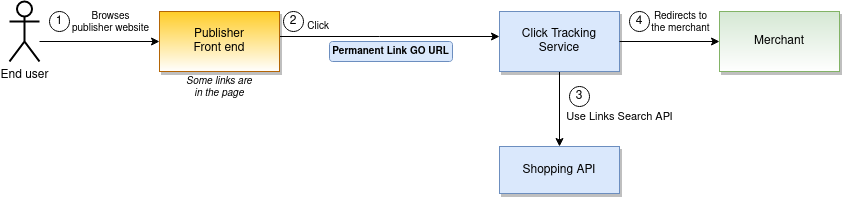
The monetized link schema is
https://{targeted country}-go.kelkoogroup.net/permanentLinkGo?country={targeted country}&id={my id}&merchantUrl={original merchant url HTTP encoded}
for instance
https://{targeted country}-go.kelkoogroup.net/permanentLinkGo?country=fr&id=e4e630c8-03eb-12eb-bf21-ba5ec25d7100&merchantUrl=http%3A%2F%2Fwww.merchant.com%3Foffer%3D123
When the end user follow a monetized link (2), Shopping API try to match the original merchant URL with an offer or a merchant URL pattern.
-
If a match is found (3a), the user is redirected to the merchant. The original URL is monetized.
-
If no match is found (3b), the user is redirected the merchant using the original URL without any monetization.
Note: You can add custom parameters to the link. See Lead Service custom parameters
URL matching
Offer Match
The given URL is compared to the offer URLs we have on our system. To make sure we have a good matching ratio, we are taking care of the cleaning of useless parameters added during the navigation of the user.
Check the Publisher Center merchant directory page to know how many offers are available by merchant for the matching.
Merchant Match
The merchant URL are not necessarily URL that lands to an offer. If the offer matching is not successful, we can fallback to another matching system based on merchant URL patterns.
Check the Publisher Center merchant directory page to know which pattern matching is available for each merchant.
Note: This feature is also called directory leads.
Solutions
Link builder
The link builder create a monetized link from a merchant URL:
https://{targeted country}-go.kelkoogroup.net/permanentLinkGo?country={targeted country}&id={my id}&merchantUrl={original merchant URL HTTP encoded}
Open the Publisher Center Link Builder page to build a monetized link from a merchant URL.
Note: the id provided by the link builder is attached to the application and not to the merchant URL. This means that you can programmatically replace your URL by a monetized link:
-
get the id from the LinkBuilder page
-
http encode the merchant URL
-
concat the strings following the above schema
Links tag
Check the Links tag page
Link search
Check the search link page