Goal
Suppose that you have a website with links to offers. Wouldn't it be nice to replace those links with URLs monetized by Kelkoo and get paid back each time a user clicks on it without having to modify your website source code? This is the purpose of the Links tag.
Usage
To include the Links tag on your web page, all you have to do is to add the following script in the head of your html file:
<script defer src="https://api.kelkoogroup.net/publisher/shopping/v2/link-monetizer/tag.js?country={targeted country}&id={my id}"></script>
You can generate this tag in the Publisher Center Links tag.
Workflow
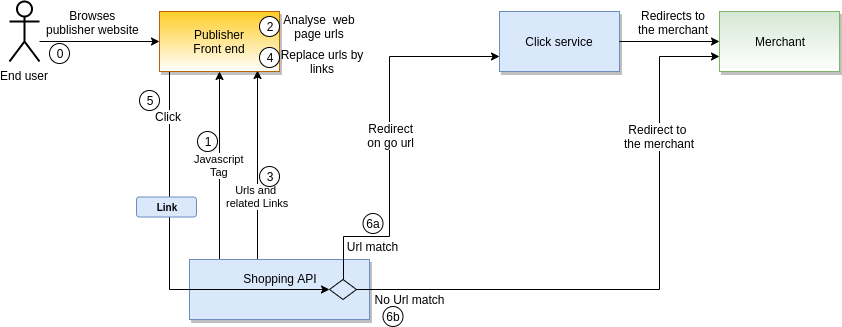
On your web page with the javascript Links tag:
-
(1) the source is dynamically loaded
-
(2) the script scan the page to find url to be monetized
-
(3) the script calls the shopping API to provide links and store the impressions. With those impressions we compute a CTR for the page and the Link in the link monetizer report.
-
(4) the script replaces the URLs with monetized links
Excluding a part of the page
For the Links tag to ignore some URLs, you can apply the CSS style nokelkoo on the <a> tag itself.
If you want an entire section to be ignored, you can also apply the nokelkoo CSS style to an entire div or section of your page. All included URLs will then be ignored.
Example
Here is an HTML page
<!DOCTYPE html>
<html>
<head>
  <script defer src="https://api.kelkoogroup.net/publisher/shopping/v2/link-monetizer/tag.js?country=uk&id=0e52ee79-b4c2-4e03-ab77-25fe00a96c85"></script>
</head>
<body>
    <h1>Welcome to our amazing website</h1>
    <div>
        <p>The links in this section will automatically be replaced by Kelkoo Links</p>
        <a href="https://merchant.com/offer">URL to an offer on a merchant website</a>
        <br>
        <p>Except URLs that are explicitly excluded</p>
        <a class="nokelkoo" href="https://noreplace.com/link">This URL will be untouched</a>
    </div>
    <div class="nokelkoo">
        <p>All URLs in this section will remain untouched because of the `nokelkoo` CSS class applied on the div</p>
        <a href="https://merchant.com/offer2">URL to an offer on a merchant website</a>
    </div>
</body>
</html>
and the result after loading page on your browser
<!DOCTYPE html>
<html>
<head>
  <script defer src="https://api.kelkoogroup.net/publisher/shopping/v2/link-monetizer/tag.js?country=uk&id=0e52ee79-b4c2-4e03-ab77-25fe00a96c85"></script>
</head>
<body>
    <h1>Welcome to our amazing website</h1>
    <div>
        <p>The URLs in this section will automatically be replaced by Kelkoo Links</p>
        <a href="https://api.kelkoogroup.net/publisher/shopping/v2/link-monetizer/permanentlink?country=uk&id=0e52ee79-b4c2-4e03-ab77-25fe00a96c85&merchantUrl=http%3A%2F%2Fmerchant.com%3Foffer">Kelkoo Link to an offer on a merchant website</a>
        <br>
        <p>Except URLs that are explicitly excluded</p>
        <a class="nokelkoo" href="https://noreplace.com/link">This URL will be untouched</a>
    </div>
    <div class="nokelkoo">
        <p>All links in this section will remain untouched because of the `nokelkoo` CSS class applied on the div</p>
        <a href="https://merchant.com/offer2">URL to an offer on a merchant website</a>
    </div>
</body>
</html>
Browser compatibility
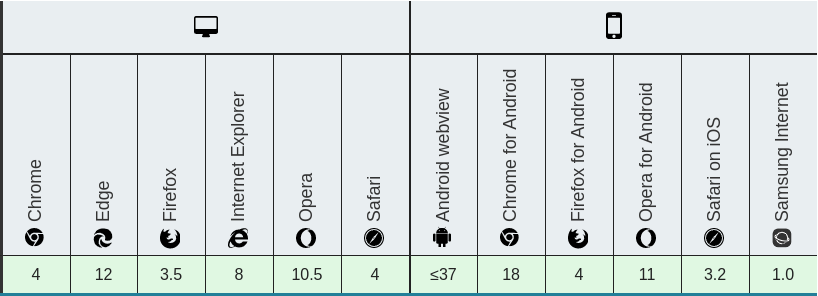
This JS is compatible with the following browsers