
When comparing KelkooGroup reports (available in the KelkooGroup Merchant Center, the Merchant Statistics API or your invoices) with the data in your own analytics platform (e.g. Google Analytics), it is common to observe differences in reported numbers. These differences arise from fundamental differences in how data is collected, defined, and counted across platforms.
Clicks vs. Sessions: Key Conceptual Difference
The core reason for discrepancies lies in the difference between clicks and sessions:
-
Click (or Lead): Counted every time a user clicks on one of your ads displayed on KelkooGroup’s network (our own sites or publisher network).
-
Session: Counted when a user interacts with your website. For example, in Google Analytics 4, a session starts with the first interaction of a user with your site and continues until 30 minutes of inactivity. GA4 does not reset the session when a new source is introduced.
Because these are two distinct metrics, they should not be expected to match exactly.
Typical Scenarios That Explain Discrepancies
Here are common scenarios that may cause differences between the number of clicks reported by KelkooGroup and the sessions recorded in your analytics tool:
1. Multiple Clicks, Single Session
Scenario: A user clicks two of your Kelkoo ads within 30 minutes.
Result:
KelkooGroup reports: 2 clicks
Your analytics tool reports: 1 session
2. Click With No Session
Scenario: A user clicks a Kelkoo ad but closes the browser or navigates away before your site fully loads.
Result:
KelkooGroup reports: 1 click
Your analytics tool reports: 0 sessions
3. User Refuses Cookie Consent
Scenario: A user clicks a Kelkoo ad, lands on your site, but does not consent to cookie usage.
Result:
KelkooGroup reports: 1 click
Your analytics tool reports: 0 sessions (no data is tracked due to lack of consent)
This scenario is particularly common in markets with strict privacy regulations (e.g. GDPR in the EU), and can significantly affect session tracking accuracy.
4. User Accepts Cookie Consent But Analytics Tag Not Fired
Scenario: A user clicks a Kelkoo ad, lands on your site, then consent to cookie usage but the Analytics Tag is not immediately fired to activate tracking. The user navigates and lose the tracking parameters. Result:
KelkooGroup reports: 1 click
Your analytics tool reports: 0 sessions
This scenario is particularly common in markets with strict privacy regulations (e.g. GDPR in the EU), and can significantly affect session tracking accuracy.
5. Adblockers and Anti-Tracking Tools
Scenario: A user uses an adblocker or privacy extension.
Result:
KelkooGroup’s click tracking is server-based and typically unaffected.
JavaScript-based analytics tools (like Google Analytics) may fail to load or track the session.
Industry estimates suggest up to 15% of traffic may go untracked in GA due to these tools.
6. Spam Detection Differences
Scenario A:
10 clicks are registered by KelkooGroup.
Kelkoo’s spam filters exclude 2 as invalid.
Your analytics tool logs all 10 sessions.
Result: 8 clicks, 10 sessions.
Scenario B:
All 10 clicks are accepted by KelkooGroup.
Your analytics tool flags 2 sessions as spam or invalid.
Result: 10 clicks, 8 sessions.
What Level of Discrepancy Is Normal?
Due to the differences outlined above, a discrepancy of 15–25% between Kelkoo Group click counts and your analytics session data is generally expected and considered normal.
However, larger discrepancies may indicate technical issues such as:
-
Cookie Consent:
-
If users don't consent, GA4 cannot track them — this can hide up to 50% of traffic.
-
Improperly configured cookie consent banners can prevent tracking
-
-
Incorrect or missing tracking parameters
-
URL redirects stripping tracking parameters
-
Server- or client-side redirects can strip UTM parameters. Use parameter-preserving redirects or propagate UTM manually.
-
-
Analytics tags loading too late or not firing at all
Additionally, Google Analytics 4’s new session definition can contribute to higher discrepancies, especially in multi-touch user journeys. See below for more details.
If you observe discrepancies exceeding 25%, we recommend reviewing your technical setup or contacting your Kelkoo account manager for personalized support.
Understanding Differences Between KelkooGroup Reported Clicks in Google Analytics 4
UTM parameters
UTM parameters are picked up by GA4 to identify the traffic source. Ensure that:
-
utm_source_platformandutm_sourceare correctly passed in each Product URL of your product feed. Refer to Setup tracking parameters in your product feed. -
GA4 is properly set up to track these parameters
Note: GA4 only sees these parameters if the user consents to cookies and the page loads with the parameters present.
GA4 Session Definition
The way Google counts sessions with GA4 differs to GA3's Universal Analytics (UA). In GA4, a new session will only be defined if a user has been inactive for over 30 minutes. This results in significant changes as to how attribution is credited. Below is an example that shows you how sessions are delineated in GA3 versus GA4.
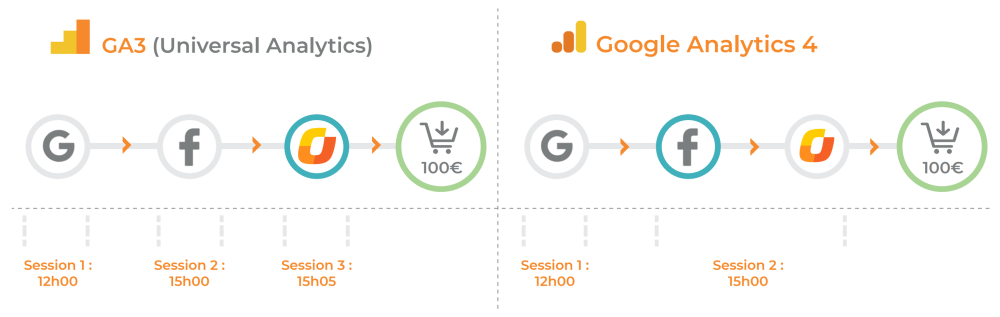
In the above example, a user visited your site three times: first from Google, then from Facebook, and finally, five minutes later, via KelkooGroup.
In GA3, the KelkooGroup visit would have been counted as a new session. In GA4, however, it is attributed to Facebook rather than KelkooGroup. The reasoning behind this change is unclear, but it appears to disadvantage traffic sources that may have played a more decisive role in influencing the user’s purchase decision.
Viewing Kelkoo Traffic in GA4
Standard but Misleading Report:
-
Reports > Acquisition > Traffic acquisition -
Use
Session source / mediumorSourceand filter bykelkoo
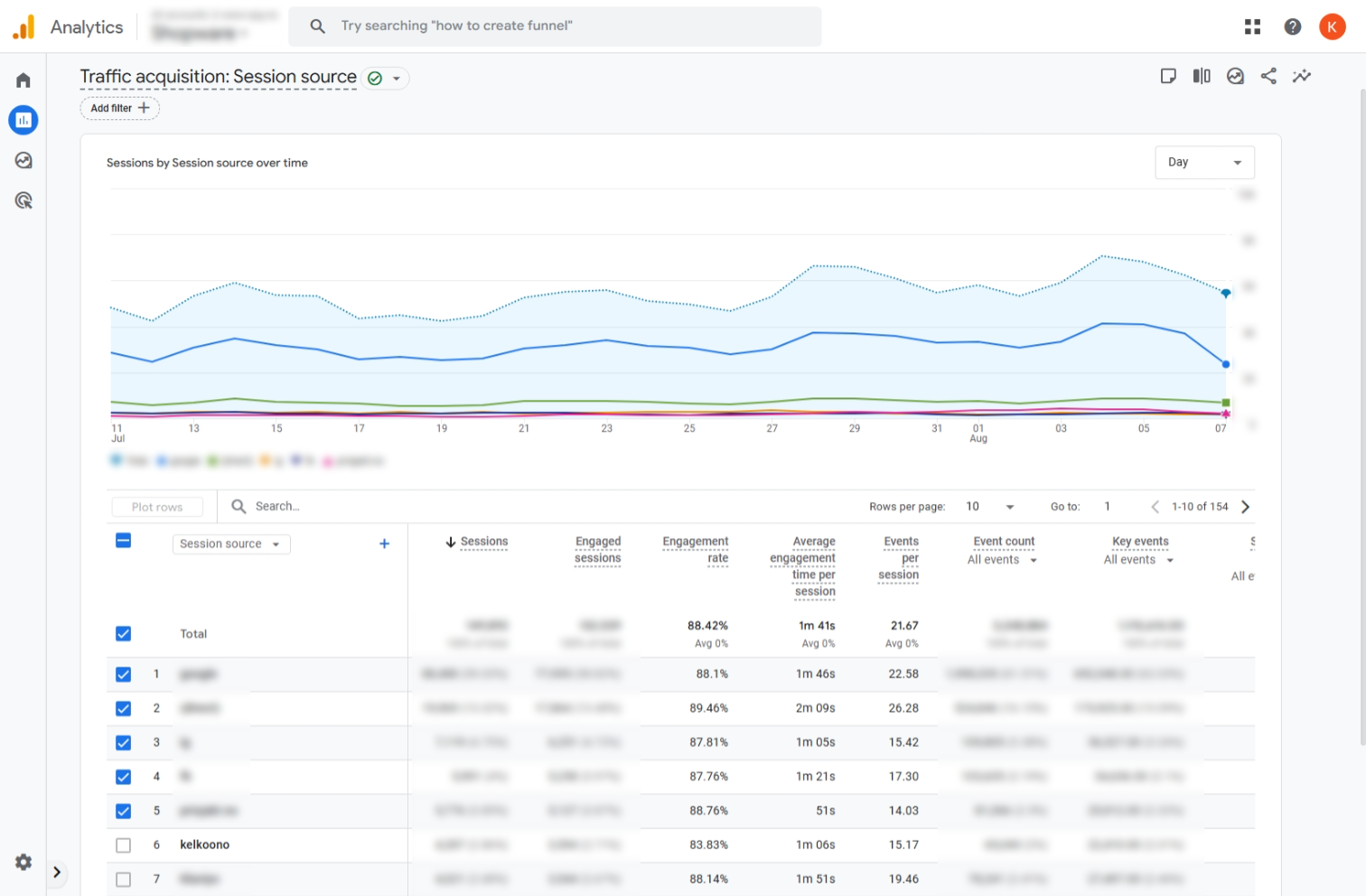
Best Report:
While it is commonplace to filter reports against utm_source=kelkoo in order to identify traffic coming from a KelkooGroup source, this is no longer the most accurate method available to you. There have been instances where Google has replaced the utm_source value from "kelkoo" to "google". This has contributed even further to observed discrepancies.
An alternative method has been identified and we highly recommend trying it.
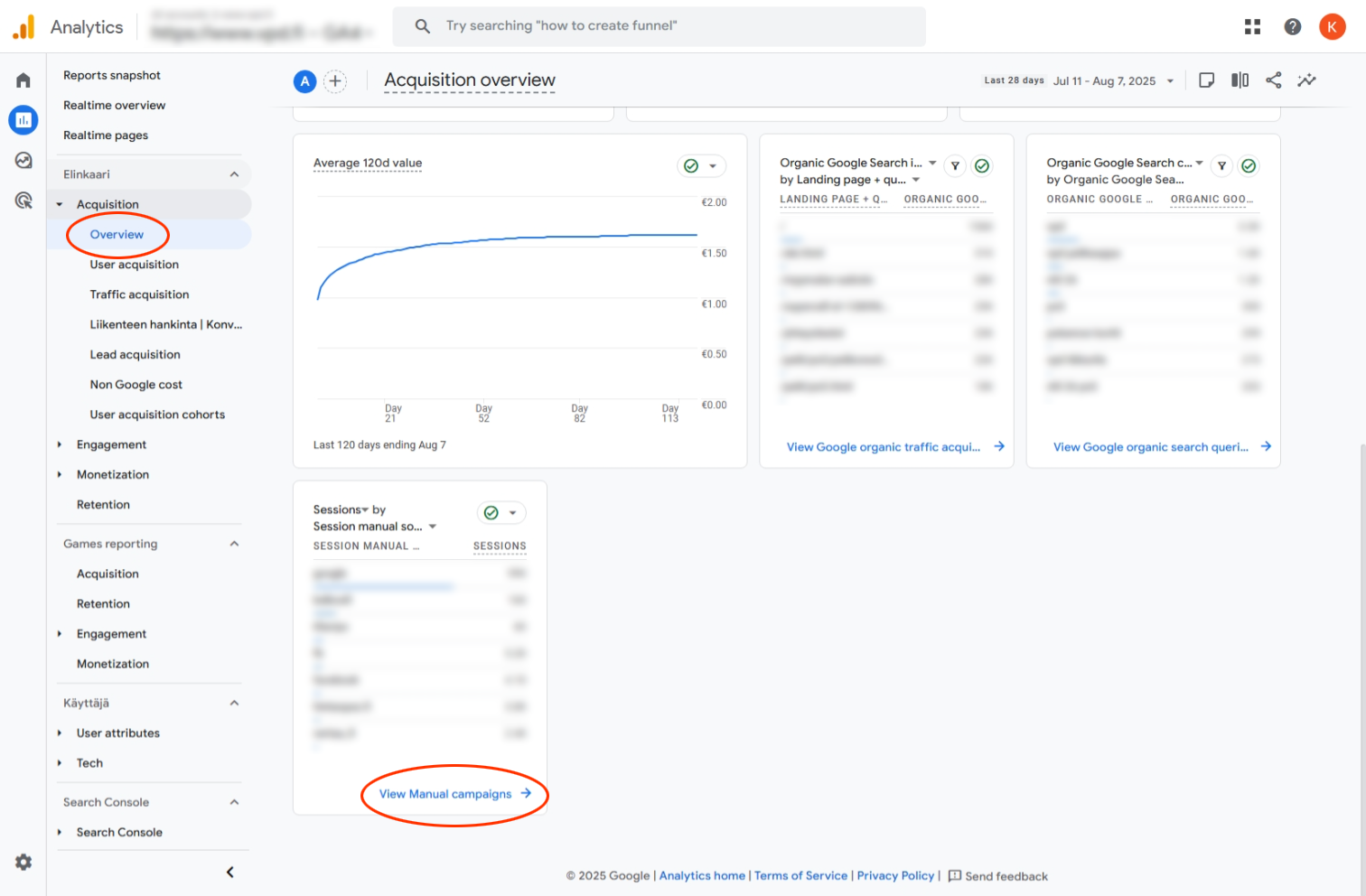
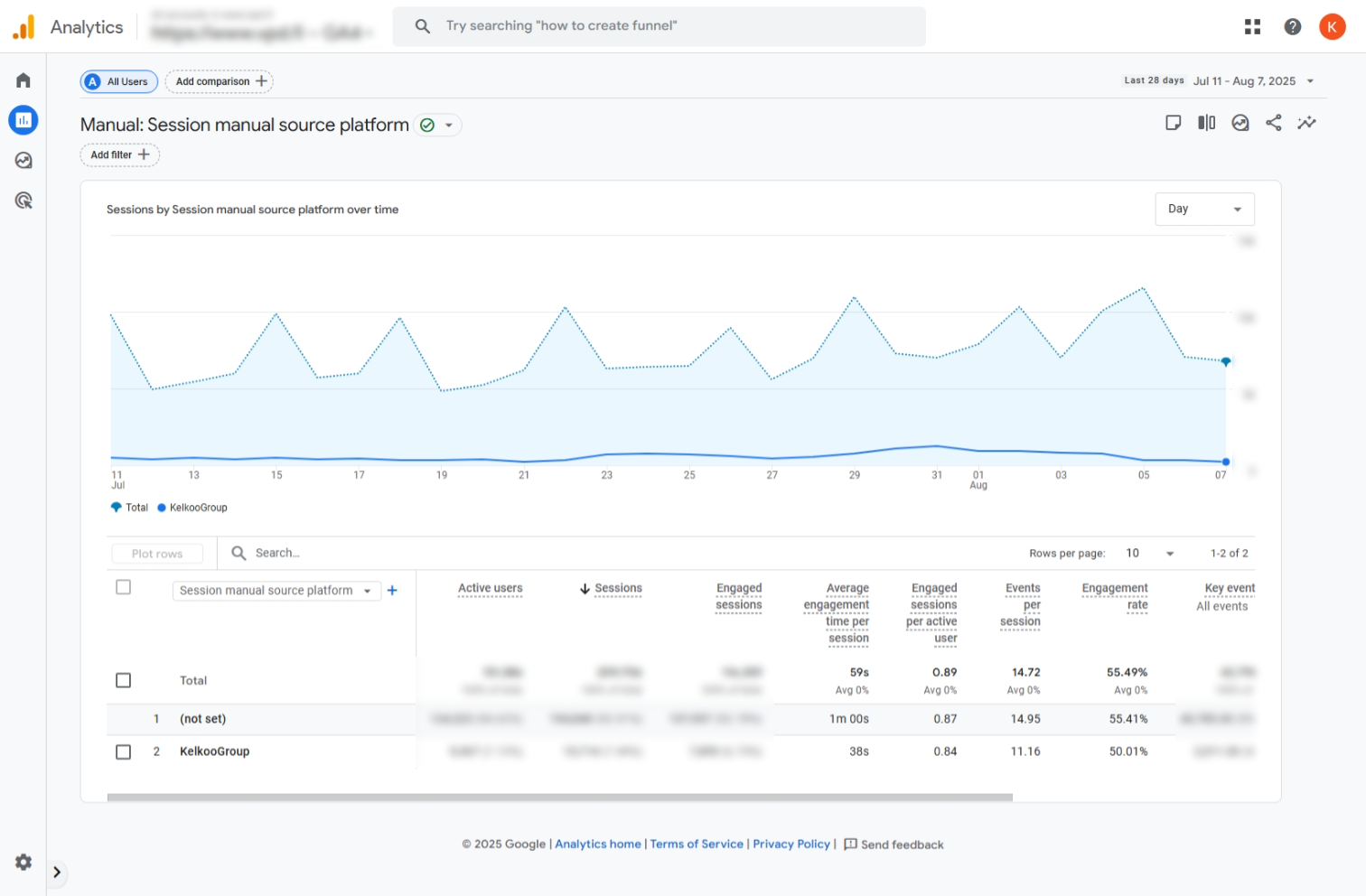
We are now actively populating the utm_source_platform parameter with the value "KelkooGroup". You can access the report that shows this value in the appropriate dimension by following these steps.
-
Go to
Reports > Acquisition > Overview > View manual campaigns -
Use Session manual source platform dimension
-
Filter for value
KelkooGroup
Note: You may need to build a custom or exploration report if not available by default.
Maximize Accuracy and Performance with Kelkoo Sales Tracking
To to take full advantage of KelkooGroup’s smart pricing algorithms, we strongly encourage all our customers to implement KelkooGroup Sales Tracking (KST) on their website.
Additionally, we recommend granting KelkooGroup access to your analytics platform (e.g. Google Analytics, Adobe Analytics). This enables us to proactively compare data, understand discrepancies, and align tracking methodologies. Transparency and alignment are in our mutual interest and key to maintaining a high-performing, efficient campaign.