
-
Connect to Kelkoo Group Merchant Extranet
-
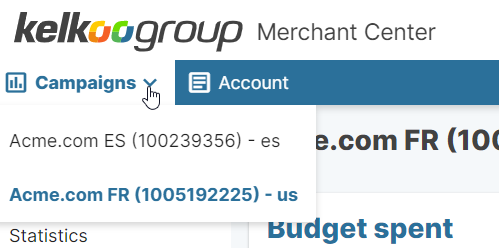
Click on the dropdown at the top left
-
Here you can see your Merchant Id and associated country code (in bracket)
In the example above you have the following
|
merchantId |
country |
|---|---|
|
100523248 |
fr |
|
100507945 |
de |
Here is the list of countries code we use at Kelkoo
|
Code |
Country |
|---|---|
|
ae |
United Arab Emirates |
|
au |
Australia |
|
at |
Austria |
|
be |
Belgium |
|
br |
Brazil |
|
ca |
Canada |
|
ch |
Switzerland |
|
cz |
Czech Republic |
|
de |
Germany |
|
dk |
Denmark |
|
gr |
Greece |
|
es |
Spain |
|
fi |
Finland |
|
fr |
France |
|
hk |
Hong Kong |
|
ie |
Ireland |
|
it |
Italy |
|
in |
India |
|
id |
Indonesia |
|
jp |
Japan |
|
kr |
South Korea |
|
my |
Malaysia |
|
mx |
Mexico |
|
nb |
Flemish Belgium |
|
nl |
Netherlands |
|
no |
Norway |
|
nz |
New Zealand |
|
ph |
The Philippines |
|
pl |
Poland |
|
pt |
Portugal |
|
ru |
Russia |
|
se |
Sweden |
|
sg |
Singapore |
|
tr |
Turkey |
|
uk |
United Kingdom |
|
us |
United States |
|
vn |
Vietnam |
|
za |
South Africa |