
Data-Driven Attribution (DDA) is Google Analytics 4's (GA4) default sales tracking attribution model. Since its inclusion in GA4 in 2020, and then its application as the default model in 2023, non-Google sources of traffic in affiliation and performance marketing have reported increasing discrepancies compared to DDA's reported sales attribution.
This document aims to clarify how these attribution discrepancies occur and guide you through alternative methods for measuring sales attribution. These complementary approaches can help you gain a more complete and accurate view of your sales performance.
It's also important to note that GA4 introduced a revised definition of user sessions, which may contribute to traffic discrepancies. For more details on this topic, please refer to our guide: Understanding Differences Between KelkooGroup Reported Clicks and Your Analytics Data.
Resolving these traffic discrepancies is a critical first step toward achieving reliable and accurate conversion attribution.
CPA Whitepaper
In early 2024, the CPA, a profession union for digital marketers based in France, released a white paper that addressed the elephant in the room. That digital marketers' and affiliate networks' contributions to retailers bottom line was under increasing pressure due to Google's own Data-Driven Attribution model; a model which saw discrepancies balloon from a maximum of 20-30% in Google's prior default attribution model (Universal Analytics), to upwards of 80% with DDA. Digital marketers exhaled a sigh of relief reading this white paper, knowing that they were not alone, and that Google, through the implementation of their attribution technology were engaging in a degree of self-preferencing that could tilt sales attribution in their favour.
Although the white paper is in French you can find an analysis of its finding in our blog article, "Digital marketing trade association casts doubt over Google Analytics 4's attribution model".
Why DDA attributes fewer sales to non-Google sources
Google Analytics has the benefit of a complete historical view on the traffic that arrives on a retailer's site. As such it is able to implement an attribution model that looks to assign complete or partial responsibility for a sale on any source.
Non-Google sources will often be reliant on "last-click channel" attribution. In a KelkooGroup context, this means that KelkooGroup will always attribute a sale to KelkooGroup if it has been a part of the user journey.
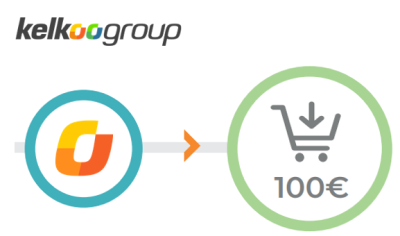
Google Analytics, on the other hand, might have the following view.
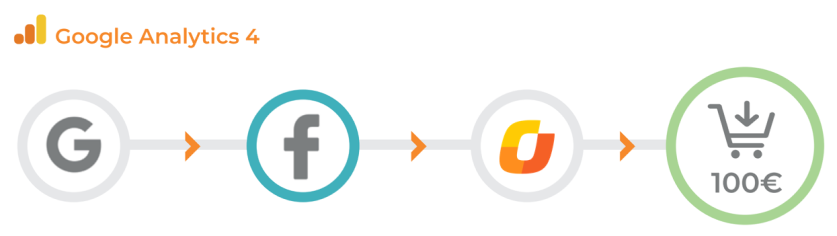
The above example shows us that at KelkooGroup we'd attribute this sale for 100 Euros to ourselves, but that GA4's DDA might actually attribute this to Facebook. The method which Google uses to determine this attribution is based on how probable a given source's inclusion in the user journey is likely to generate a sale. You can find more information on this in Google's own documentation.
This attribution model is one that is referred to as "multi-touch", and using their algorithm, Google is able to assign partial attribution to a source. For example, they may decide that in the above user journey Google is responsible for 40% of the sale, Facebook for 40% and KelkooGroup for the remaining 20%. The goal of a multi-touch attribution model is that it is designed to try and reward all sources that contribute towards a sale, regardless of when they occur in the user journey. This is very different to established models of attribution like "last-click", which favour the last source a user visited before reaching the retailer and making the sale. Last-click attribution makes the assumption that the last source a user has visited is responsible for the user making the decision to purchase and places a high value on recency.
Given how differently the above models operate, it's easy to see how discrepancies occur. But beyond the assumptions behind the DDA model, there are some design decisions that are hard to reconcile, like how DDA defines a session.
What are scopes?
GA4 uses the concept of scopes through which to view site behaviour. Scopes are essentially different lenses through which the data can be viewed and operate within a particular hierarchy.
-
User - the highest level which represents a visitor to your site.
-
Session - below a user is a session which represents a group of user interactions within a given timeframe (as explained in the previous section)
-
Event - a specific interaction or occurrence on your site that occurs within a session
-
-
The concept of scopes are important because while GA4 does offer different ways of viewing sales data other than via the default DDA model, you're only able to interrogate the last-click model at "User" or "Session" scopes. And remember, GA4's definition of sessions is still different to that of GA3's, so you will not be able to replicate GA3's UA exactly.
But why this approach with scopes at all you may ask? DDA registers sales at Event scope level. This approach is what allows DDA to be multi-touch, as an event can be associated to multiple sessions.
Configuring GA4 for Fair Attribution
Go to Admin > Data Display > Events > Attribution Settings:
-
Attribution Model: Review default (DDA) vs Last Click
-
Lookback Window: Set appropriate window for sales (e.g. 30 days)
-
Channels that can receive credit: Change to
Paid and Organicto avoid Google bias
Viewing Sales (Conversions) from Kelkoo Traffic
Using Attribution Reports
Last-click may be the model that has persisted for over 20 years in e-commerce, but that doesn't necessarily make it the best way to view conversions. DDA clearly has weaknesses too and we've seen all sorts of models come and go in the intervening years. What's clear is that no attribution model offers a definitive view on your sales. Each attribution model is merely an interpretation of available data.
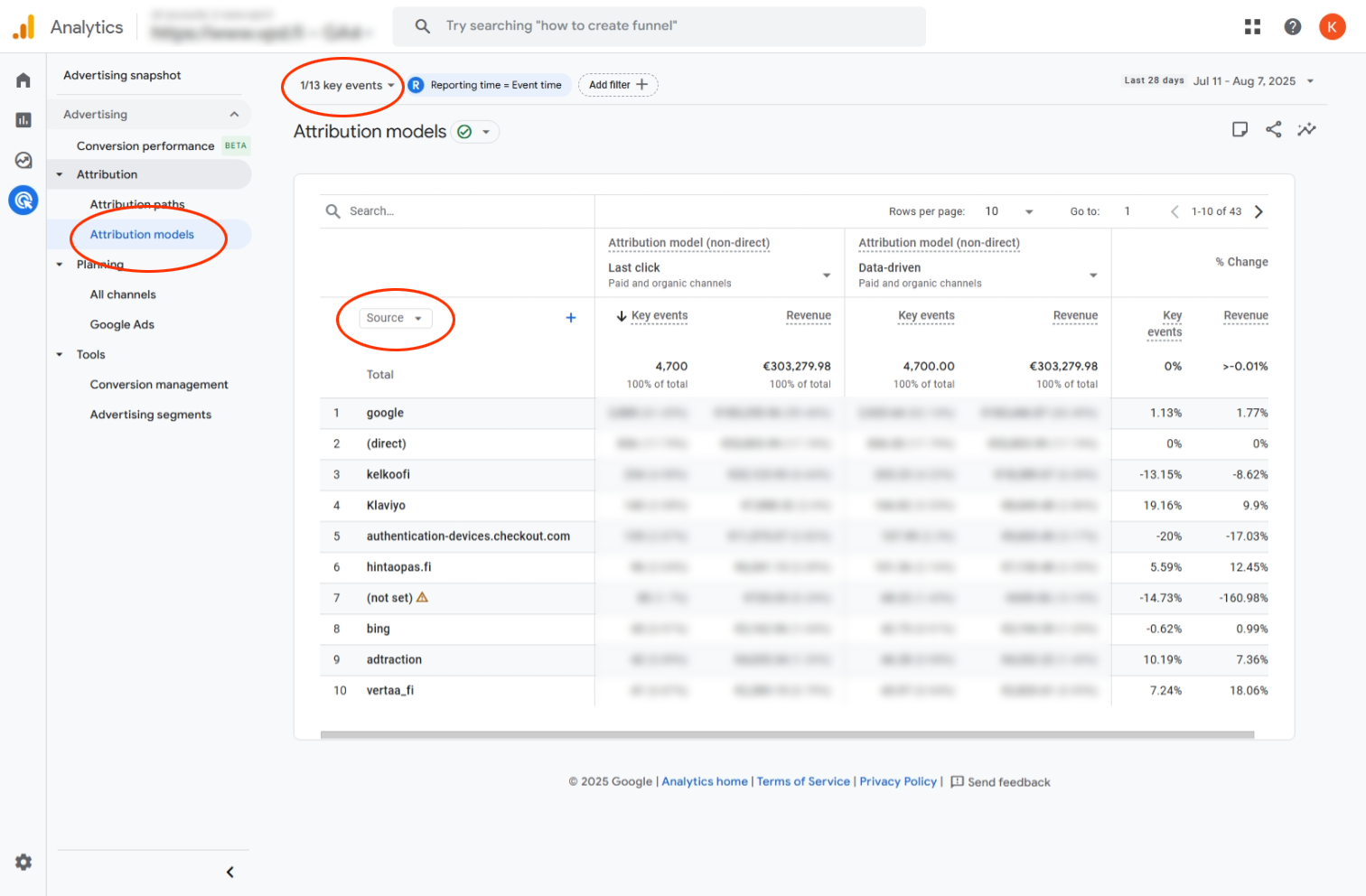
At KelkooGroup, we strongly recommend reviewing your sales performance via multiple attribution models and luckily GA4 allows you to compare DDA with last-click reasonably easily.
-
Navigate to
Advertising > Attribution > Attribution models -
Select key event: purchase
-
Compare attribution models: Data Driven vs Last Click
-
Filter by Source = kelkoo
Digging Deeper
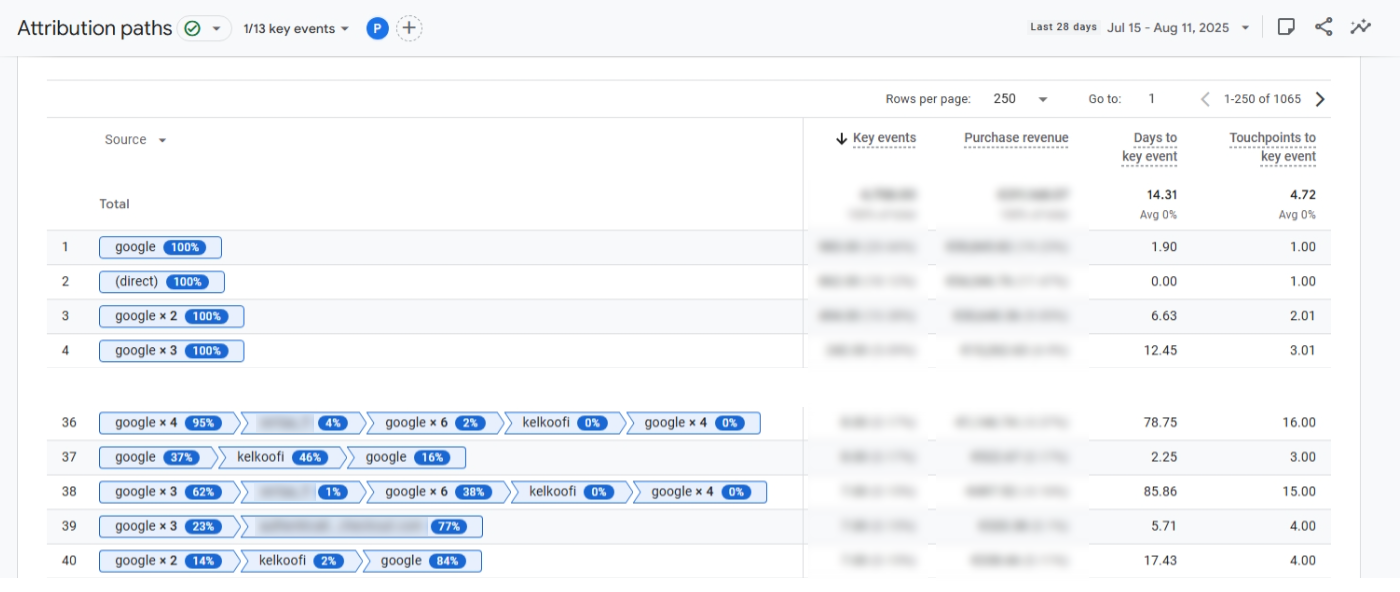
Seeing the details of the multi-touch model can be done quite easily, and it can help you understand how DDA is attributing sales to each of your traffic sources.
-
Advertising > Attribution > Attribution paths: Understand how different sessions contribute to a sale
Discrepancy analysis: A case study
As part of our efforts to understand how non-Google sales sources are represented in DDA, we took a month of data from a prominent merchant and compared the data GA4 was providing versus the sales data we were registering in our own systems.
We were able identify the following sources of the discrepancies:
-
Sales not reported in GA4
-
Either Kelkoo Sales Tracking of GA4 can miscount
-
-
Sales not attributed to Kelkoo due to DDA
-
Sometimes 0% attribution
-
Sometimes KelkooGroup source omitted due to GA4's definition of sessions
-
-
DDA partially attributing sales to Kelkoo
-
Kelkoo Sales Tracking not registering a sales
-
Kelkoo Sales Tracking not registering a partially attributed sale
-
And of course, users not consenting to cookies
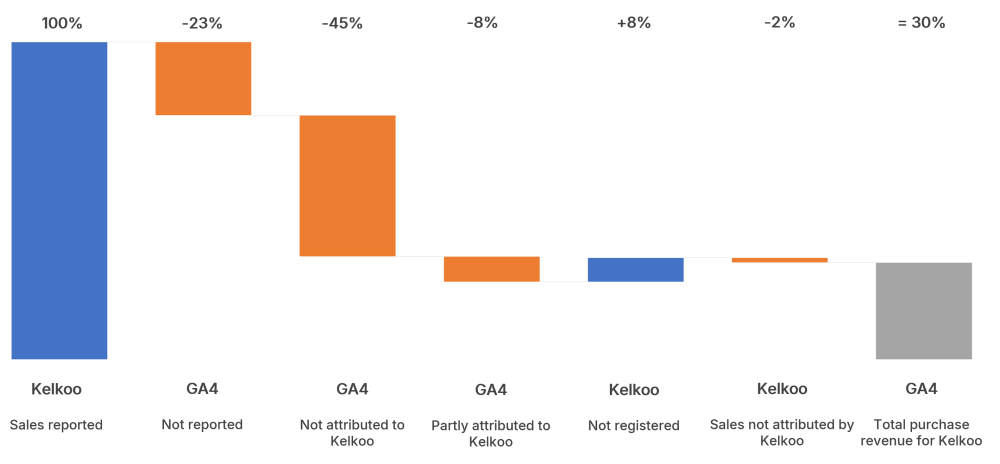
This analysis showed that GA4's DDA model only attributed 30% of total sales value to KelkooGroup. This is consistent with the findings of the CPA whitepaper which saw many platforms report discrepancies as high as 80%.
Of course, we acknowledge that the sales reported by Kelkoo's Sales Tracking technology is just one attempt to find the truth in these conversions, as is GA4's DDA. What this analysis does, is highlight the need to view sales reporting from more than one perspective, rather than relying on a single "source of truth".
Summary
GA4 offers a powerful, but complex, set of tools to understand user journeys. Due to its evolving default attribution model (DDA), it can significantly underreport contributions from non-Google channels such as KelkooGroup. By properly configuring GA4 and using the correct reports, you can recover a much more accurate view of our traffic and performance.
If you need assistance implementing any of these practices or understanding your reports, reach out to your KelkooGroup account manager.