
How to test your implementation
-
Go on your Kelkoo Merchant Center and log into your account
-
Select the campaign you want to test in the top left selector
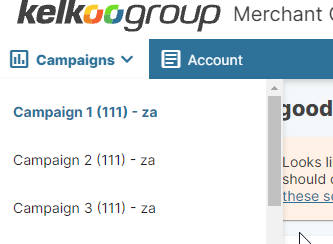
-
then click on the Kelkoo Sales Tracking Installer link in the left menu or directly click here
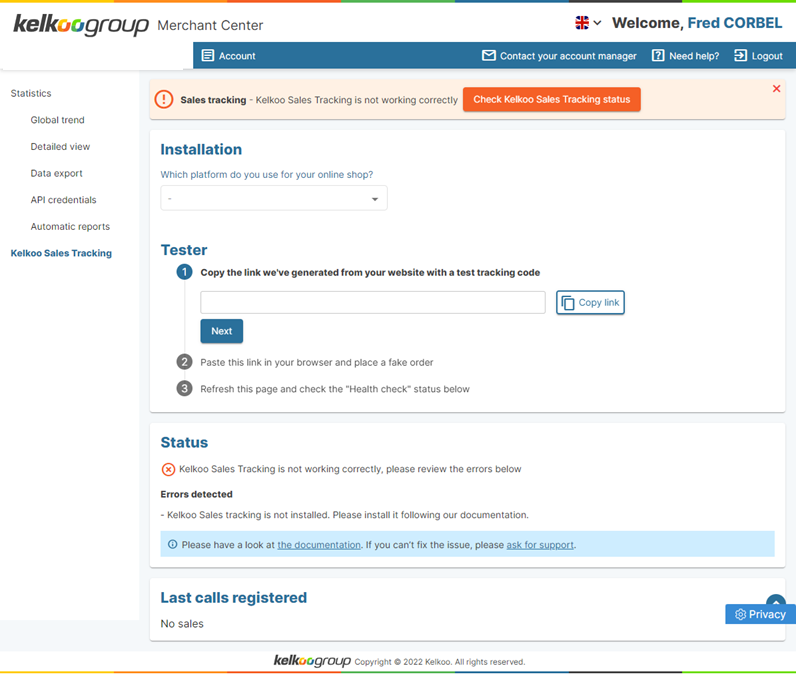
The tool is structured around 4 sections:
-
Warning banner that will appear in all pages if your Kelkoo Sales Tracking installation is not working properly.
-
A Tester section to help you install and test your setup in 3 simple steps
-
A Status section that will give you more information about potential errors/warnings
-
The Last Call Registered section that lists the last calls we've received from your Kelkoo Sales Tracking pixel with all the information sent.
Verify that we register sales
You simply need to follow the Tester wizard and check the Status/Last Call registered section for further information
Verify that we correctly process sales information
If we register sales correctly, the following day of your test sale, please check the Statistics section in your Merchant Center. You should see your sales recorded with the correct order value.
Important! Check regularly that sales are being registered. This is even more important to do after you have implemented updates or changes to your site.
In case of issues, check our troubleshooting guide
If you are facing issues on the tracking or sales processing part, please have a look at our Common Issues section.