
Goal
Publisher Parameters are a suite of parameters that should be used to pass additional information to Kelkoo about your traffic. These values should be passed to Kelkoo against each click that is made on a Kelkoo listing.
Values for publisher parameters can be added directly to Links and Search API queries, this will have the effect of prepopulating Go URLs in the response with these values. Alternatively, you can choose to only append Go URLs (permanentLinkGo and sitesearchGo URLs) with these values directly - this is particularly useful if you cache Links/Offers or serve them elsewhere.
Below you can find a guide as to how to add these parameters to your clicks.
Allow publishers to improve context information on clicks. Some information can not be inferred from clicks alone (because information is not yet known on Go URL generation, not reliably available through http standards...). For this, some information can be added as lately as on the actual click by adding some http parameter to the Go URL.
General workflow
Publisher parameters can be added to a Go URL or Link as a way to track your leads in the Publisher Center, to give you a much deeper level of reporting granularity.
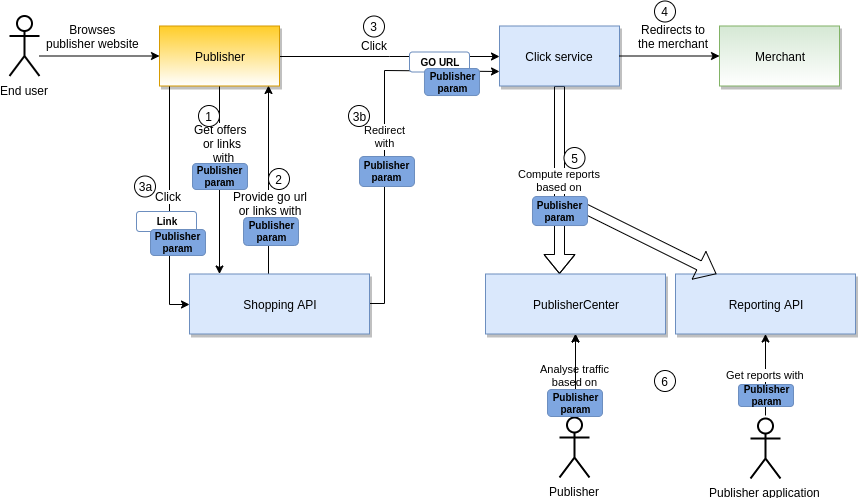
You can put those parameters at different step depending on when you have the information. The parameters at a step will be kept all the way to the end of the workflow.
-
(1) Forge: The first step forges:
-
the Go URL from Shopping API Search and Shopping API Feed offers
-
the link from Shopping API Links
-
at this first step you might already have the information on where the Go URL or Link will be published.
-
-
(2) Provide: The system provides Go URLs or Links with the publisher parameters previously added. You can add/update the publisher parameters at this step as well if needed.
-
(3) Click: The end user clicks on the Go URL or Link with the publisher parameters. You can add/update the publisher parameters at this step as well if needed.
-
or (3a) The end user clicks on the link with the publisher parameters and (3b) is redirected to the click service with a Go URL with the publisher parameters.
-
Using Shopping API Feed offers, this is the only step when you can add the parameters: see Focus on Feed offers. Using Shopping API Search or Shopping API Links you can also add/update the publisher parameters at this step.
-
-
(4) Redirect: The end user is redirected to the merchant.
-
(5) Compute: The system compute traffic and revenue reports based on the publisher parameters provided on the GO Url.
-
(6) Analyse: The publisher can analyse his traffic and revenue based on the publisher parameters.
It is required that you provide publisher parameters where available. Transparency is requested by the market and sharing information will give you access to a wider selection of merchants.
Those provided information will be available through the Reporting API / Publisher Center.
Note: This is possible as the publisher parameters are excluded from the Go Url signature.
Focus on Search offers
(1) Forge:
While calling Shopping API Search,
add the following to the query:
&originReferer=[origin referer]&publisherClickId=[publisher click id]&publisherSubId=[publisher sub id]&publisherSubName=[publisher sub name]&publisherTrafficType=[publisher traffic type]
The Go URL of each offers in the result will have those parameters.
For instance if you already know that the offers will be published in a subnetwork with the id 123456789, add &publisherSubId=123456789 to the search query.

(2) Provide
the Go URL of each offer in the result will have &publisherSubId=123456789 appended
https://yz-go.kelkoogroup.net/sitesearchGo?.ts=1678190960723&.sig=Ul_ZC53dCvD8MgroAKXimyvK8e4-&affiliationId=97979797&comId=10203040&country=yz&offerId=3dd396eafc0e1edc7c2ddf6d5b7dfa9a&searchId=1076100332961511_1678190960601_359982&service=36&tokenId=0ece426d-359d-4949-bc21-051287f6ddae&publisherSubId=123456789
(3) Click
Any publisher parameters added in the Provide step will be present. You can enrich or replace the existing parameter values or add other parameters at this stage. For instance, you can add the publisher click id at this step: add &publisherClickId=[publisher click id] to the existing Go URL.
Focus on Links
This is almost the same process as Search offers but with the Link.
(1) Forge:
While calling Shopping API Links
add the following to the query:
&originReferer=[origin referer]&publisherClickId=[publisher click id]&publisherSubId=[publisher sub id]&publisherSubName=[publisher sub name]&publisherTrafficType=[publisher traffic type]
The Link returned will have those parameters appended.
For instance if you already know that the Link will be published in the webpage mywebsite.com, add &originReferer=my-web-site.com%2Fcountry%2Fshop-love-shopping%2FbestDeals.html to the search query.

(2) Provide
the Link will have &originReferer=my-web-site.com%2Fcountry%2Fshop-love-shopping%2FbestDeals.html
https://yz-go.kelkoogroup.net/permanentLinkGo?country=yz&id=GREHGQ654687&merchantUrl=http%3A%2F%2Fwww.merchant.com%3Foffer%3D123&originReferer=mywebsite.com
(3a) Click
Any publisher parameters added in the Provide step will be present. You can enrich or replace the existing parameter values or add other parameters at this stage. For instance, you can add the publisher traffic type at this step: add &publisherTrafficType=[publisher traffic type] to the existing link.
Focus on Feed offers
With feed offers, since their provision is an asynchronous process, we consider that the client doesn't necessarily know where the Go URL will be published at this stage. As such, we don't give the opportunity to specify any publisher parameters at the (1) Forge and (2) Provide steps.
The publisher should add all the parameters at the (3) Click step by appended them to the Go URL.
For instance, the feed offers provide this Go URL,
https://fr-go.kelkoogroup.net/offersearchGo?.ts=1687180981595&.sig=VSlDTTuKEf4xdnkWEsCY-&affiliationId=999999&comId=100507258&country=yz&offerId=006b5d69411c8e29&service=37&tokenId=c341cbcd-b10
you can enrich it at the click step by adding all the publisher parameters you want and end up with an URL like this one:
https://fr-go.kelkoogroup.net/offersearchGo?.ts=1687180981595&.sig=VSlDTTuKEf4xdnkWEsCY-&affiliationId=999999&comId=100507258&country=yz&offerId=006b5d69411c8e29&service=37&tokenId=c341cbcd-b10&originReferer=my-web-site.com%2Fcountry%2Fshop-love-shopping%2FbestDeals.html&publisherClickId=123546465&publisherSubId=125&publisherTrafficType=content
Publisher parameters
Parameter originReferer
|
|
|
|---|---|
|
Description |
The URL for the originating traffic should be passed as a percent-encoded value. This should be the full URL, not a placeholder, or a redirect URL. |
|
Is required ? |
Required for all publishers |
|
Values |
Percent-encoded string |
|
For manually created Links |
|
|
Shopping API Links query |
|
|
Shopping API Search query |
|
|
Shopping API Feeds query |
Parameters should be added directly to Go URLs in the query response |
|
Go URLS |
Parameter publisherClickId
|
|
|
|---|---|
|
Description |
Pass a unique ID per click, designed to help you associate Kelkoo reporting to your own data more easily |
|
Is required ? |
Optional |
|
Values |
String |
|
For manually created Links |
|
|
Shopping API Links query |
|
|
Shopping API Search query |
|
|
Shopping API Feeds query |
Parameters should be added directly to Go URLs in the query response |
|
Go URLS |
Parameter publisherSubId
|
|
|
|---|---|
|
Description |
Pass an ID for each traffic-generating entity within your own network. Do not pass unique per click values to this parameter. Do not group traffic sources under a single sub ID. |
|
Is required ? |
Required for publishers driving traffic from multiple websites/sources |
|
Values |
String |
|
For manually created Links |
|
|
Shopping API Links query |
|
|
Shopping API Search query |
|
|
Shopping API Feeds query |
Parameters should be added directly to Go URLs in the query response |
|
Go URLS |
Parameter publisherSubName
|
|
|
|---|---|
|
Description |
Pass a name for each traffic generating entity within your own network |
|
Is required ? |
Required for publishers driving traffic from multiple websites/sources |
|
Values |
String |
|
For manually created Links |
|
|
Shopping API Links query |
|
|
Shopping API Search query |
|
|
Shopping API Feeds query |
Parameters should be added directly to Go URLs in the query response |
|
Go URLS |
Parameter publisherTrafficType
|
|
|
|---|---|
|
Description |
Pass a pre-defined value to categorise your traffic type. Note that some merchant campaigns do not permit some traffic types |
|
Is required ? |
Required for publishers driving traffic from multiple websites/sources |
|
Values |
Pre-defined string. One of the following values: affiliation, bnpl, classified, content, coupons, displaynative, domain, emailmarketing, mediabuyer, pcw, programmaticplatforms, publishernetwork, retailmedia, retargeting, searchengine, socialmedia, toolbar, other |
|
For manually created Links |
|
|
Shopping API Links query |
|
|
Shopping API Search query |
|
|
Shopping API Feeds query |
Parameters should be added directly to Go URLs in the query response |
|
Go URLS |
Parameter custom1
|
|
|
|---|---|
|
Description |
Pass a value of your choosing up to 511 characters |
|
Is required ? |
Optional |
|
Values |
String |
|
For manually created Links |
|
|
Shopping API Links query |
|
|
Shopping API Search query |
|
|
Shopping API Feeds query |
Parameters should be added directly to Go URLs in the query response |
|
Go URLS |
Parameter custom2
|
|
|
|---|---|
|
Description |
Pass a value of your choosing up to 127 characters |
|
Is required ? |
Optional |
|
Values |
String |
|
For manually created Links |
|
|
Shopping API Links query |
|
|
Shopping API Search query |
|
|
Shopping API Feeds query |
Parameters should be added directly to Go URLs in the query response |
|
Go URLS |
Parameter custom3
|
|
|
|---|---|
|
Description |
Pass a value of your choosing up to 127 characters |
|
Is required ? |
Optional |
|
Values |
String |
|
For manually created Links |
|
|
Shopping API Links query |
|
|
Shopping API Search query |
|
|
Shopping API Feeds query |
Parameters should be added directly to Go URLs in the query response |
|
Go URLS |