
Please, read this presentation first if you need a general view on categories in KelkooGroup.
On ShoppingAPI, we have several services to get offers by categories
-
Category feeds: we can get categories as a feed
-
Offer feeds: we can get offers as a feed for a category
-
Offer search: we can search offers from the given category
Category tree
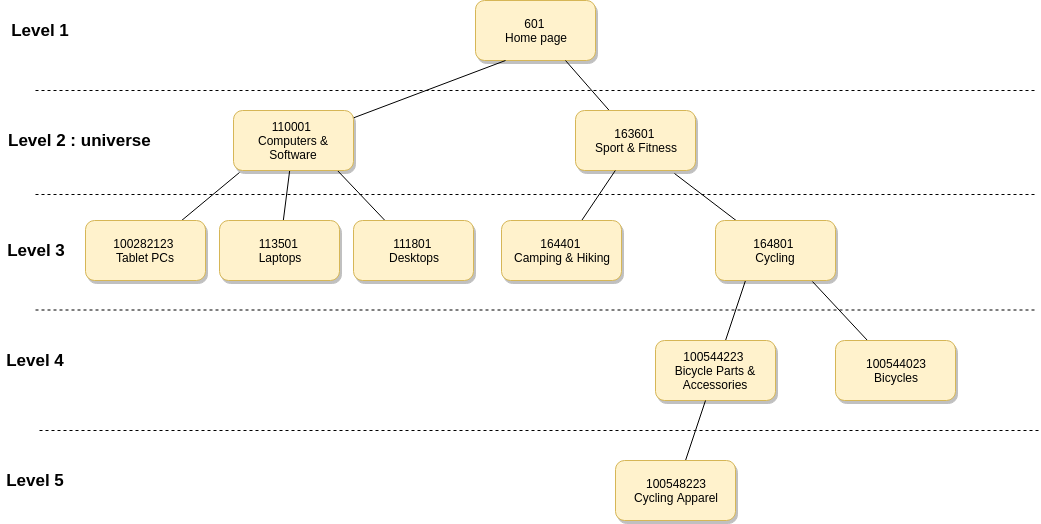
Consider the following category tree:
-
The level is defined by the distance to the root of the tree. Given the fact that the root is at level 1. For instance, 164801 Cycling is at level 3.
-
The level 2 is also called universe. For instance, 163601 Sport & Fitness is a universe.
Offers in the category tree
Following the previous example, we have put some offers in the tree. To better understand how it's working:
-
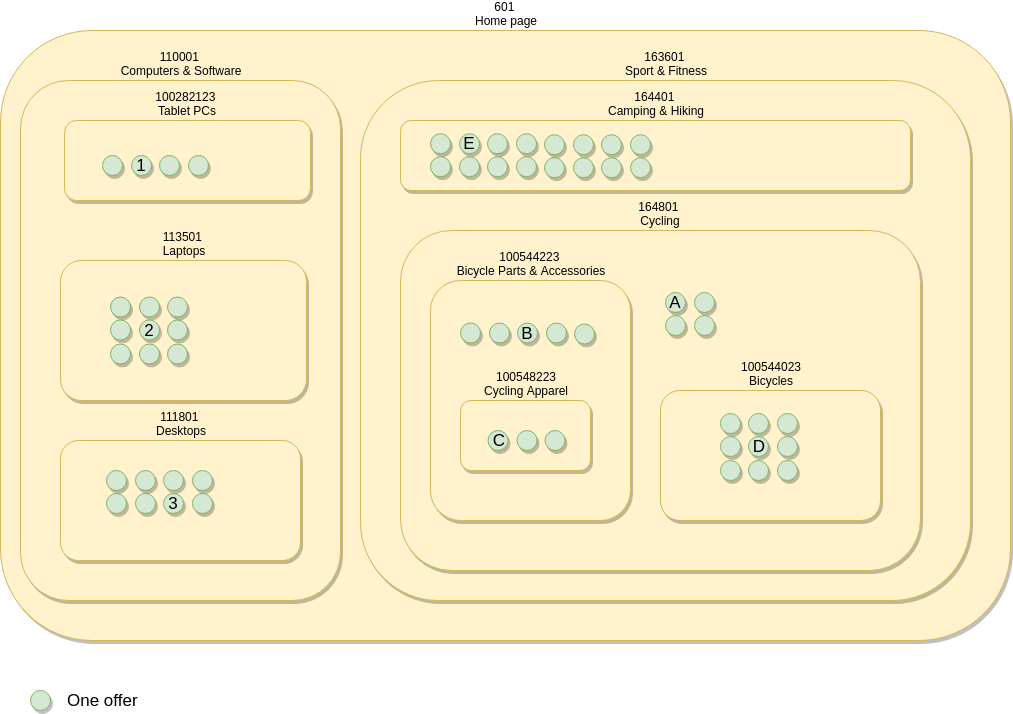
the tree has been represented with some plates
-
each plate is a category and the sub categories are on its plate
We can see in the example and you can consider as rules that :
-
Universes (categories at level 2) don't have any offers
-
The offers can be at any level greater that 3 included: for instance the offer A is in the category 164801 Cycling even if this category has subcategories. As a consequence the offers are not necessarily on a leaf category: category without sub categories.
Using
-
Offer feeds
-
Offer search
with the filter on category_id would return the offers on the plate: directly on the category plate or on the plates that are above it.
For instance,
|
Given the category |
Offers among the result |
|---|---|
|
601 Home page |
1, 2, 3, A, B, C, D, E |
|
110001 Computers & Software |
1, 2, 3 |
|
113501 Laptops |
2 |
|
163601 Sport & Fitness |
A, B, C, D, E |
|
164801 Cycling |
A, B, C, D |
|
100544223 Bicycle Parts & Accessories |
B, C |
|
100548223 Cycling Apparel |
C |
Warnings :
-
Avoid duplicated offers: This means that you need to be really careful when you get offers from categories at different levels. You would end up with several times the same offers in your system. You would also overload your and our systems for nothing.
-
Make sure to not miss offers: To get all offers, filter the category tree at level 1, 2 or 3 not above, otherwise with you would miss some offers:
-
for instance, if you get offers from categories at level 4, you would miss offers 1, 2, 3, E and A
-