
As our offers are changing quite often, you should retrieve offer feeds also quite often.
Otherwise you would present offers to your clients that are not in Kelkoo system anymore. It would lead the client to dead end: HTTP 404 on LeadService) and not the merchant offer.
Limitations
Daily limitations are in place such that you will be unable to retrieve more than 5x the total number of offers for a given country within a 24 hour period. For example, if a country had 1m offers, your daily quota would be 5m offers. This quota can be applied to any subset of offers, meaning with a 5m quota you could download a 100k subset of offers up to 50 times within a 24 hour period. However, it is important to note that Kelkoo Group merchants are not updated in our repository nearly that frequently. As such our recommendation is to refresh between 1 and 5 times within a 24 hour period.
Get all offers
There are several ways to retrieve all the offers:
-
as one file (one call to the API)
-
as one file split in 2, 4 or 8 parts
-
as one file per category
-
as one file per merchant
We recommend the 1st or 2nd choice which are simpler to handle.
If some categories or merchants do not interest you, you may consider the other options.
Get all offers in one file
In order to download all offers at once, you only need to call the service without specifying a merchant nor a category filter.
See the related code sample
Get all offers with parallel requests
See the section below "Get all offers in 2, 4 or 8 parts".
Get all offers in 2, 4 or 8 parts
If you are interested in getting all the offers, you can also choose to download them as a set of 2, 4 or 8 files.
To do so, you can choose the numberOfParts (2, 4 or 8) and the part (1 to the number of parts you choose) in your requests.
This can have several benefits:
-
downloading each part in parallel, this will reduce the time to download all offers
-
processing each part in parallel if your backend processing supports it
-
limiting how many offers to download again in case of network issues
See the related code sample
Get offer feeds by category
WARNING Abusive usage of this feature could hit the number limit of concurrent requests quota.
Please read first the offers by category guide.
In order to download offer feeds by category, you need to:
-
retrieve the list of available categories,
-
and for each category you are interested in, download the offer feed for this category
Note that the list of categories varies over time, thus you should refresh it every time you are about to download an offer feeds.
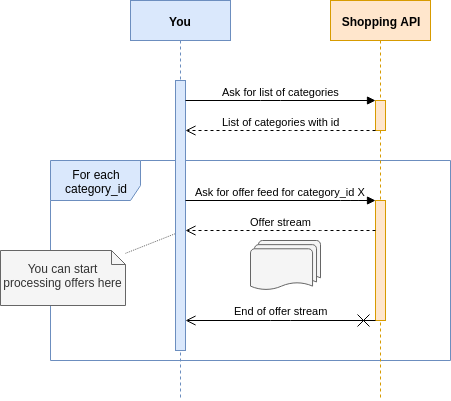
Important: There is a limitation on parallel downloads for the same user, don't ask for all categories in parallel. If your breakdown by category aim is to do parallel requests, please use numberOfParts and part parameters instead. Check "Get all offers in 2, 4 or 8 parts" above.
See the related code sample
Get offer feeds by merchant
WARNING Abusive usage of this feature could hit the number limit of concurrent requests quota.
In order to download offer feeds by merchant, you need to:
-
retrieve the list of available merchants,
-
and for each merchant you are interested in, download the offer feed for this merchant
Note that the list of merchants varies over time, thus you should refresh it every time you are about to download your offer feeds.
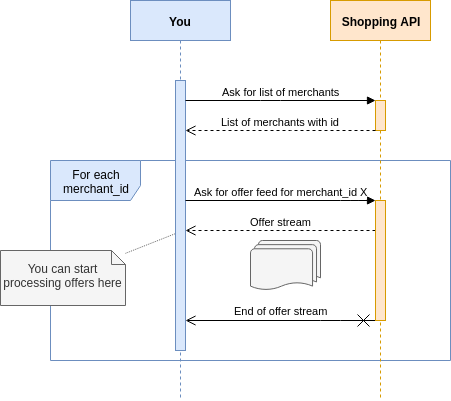
Important: There is a limitation on parallel downloads for the same user, don't ask for all merchants in parallel. If your break down by merchant aim is to do parallel requests, please use numberOfParts and part parameters instead. Check "Get all offers in 2, 4 or 8 parts" above.
See the related code sample
Get some offers
If you need to get only a subset of the offers, you might be interested only in a restricted list of merchants of categories. In this case, iterate only on the categories of merchants you need.
See the related code sample