What's a Kelkoo link?
A Kelkoo link is an url to a merchant that you, as publisher, want to get revenue from.
Without Kelkoo link
If you propose directly the url to your end user, they will go directly to the merchant, and you won't get any revenue from it.

With Kelkoo link
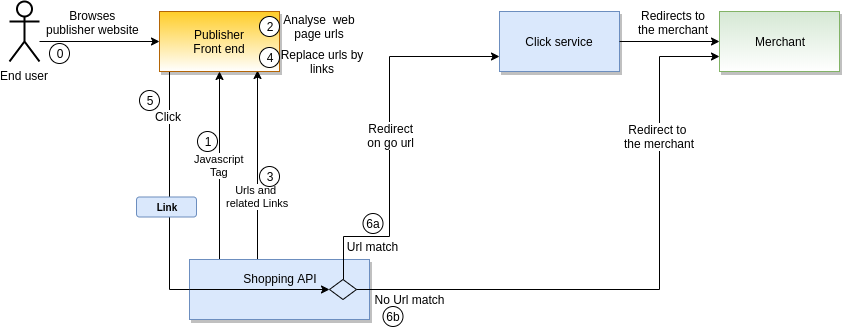
If you transform the url to a Kelkoo link and propose this Kelkoo link to the end user, this one will pass through Kelkoo system before been redirected to the merchant. And you, as a publisher, can get some revenue from this traffic, as long as the url provided points to a merchant of Kelkoo network set up for links and available.
Kelkoo link monetized
If Kelkoo system find a match to an accessible merchant, you will get revenue from it. The end user will be redirected to the merchant.

Kelkoo link not monetized
If Kelkoo system do not find a match to an accessible merchant, you won't get revenue from it. The end user will be redirected to the merchant.

Which merchants are accessible for link?
You can get this information from Shopping API or the Publisher Center.
On the Shopping API Merchant feeds
The merchant feeds give you all the merchants available at the time of the request. You can filter on the merchant to get only the merchant available for links by adding merchantMatch=yes in the request.

In merchant feeds data, you will be able to get at merchant level:
-
if the links are properly set up with
supportsLinksMerchantMatchfield -
which urls can match this merchant with
directoryLinksfield: list the different url patterns set up for the matching and the revenue you can get from it.
Json extract:
{
  "id": 142453453,
  "name": "My merchant",
  "url": "https://www.mymerchant.at",
...
  "directoryLinks": [
    {
      "urlTemplate": "https://www.mymerchant.at*",
      "estimatedCpc": 0.1183,
      "mobileEstimatedCpc": 0.07098
    }
  ],
  "supportsLinksOfferMatch": true,
  "supportsLinksMerchantMatch": true,
...
}
On this example, if an end user on a desktop click on a Kelkoo link with https://www.mymerchant.at/nice/path, you will get around 0.1183 EURO revenue.
See other examples.
Check the request builder guide to create easily a request to Shopping API to get those data.
On the Publisher Center
All the information available through Shopping API Merchant feeds are accessible in the Publisher Center in the merchants directory page

How can I build a Kelkoo link from an url?
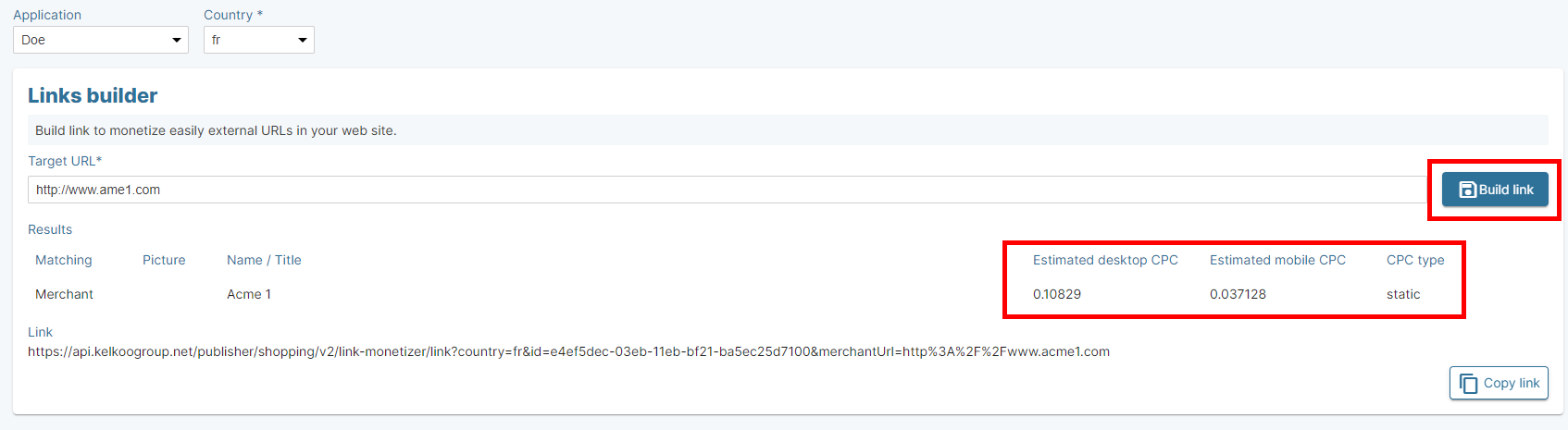
You can build a Kelkoo link from an url on the Publisher Center Links builder page. Once you have created a first link, you don't really need to come back to this page each time. For a given publisher, only the targeted url of the merchant change from a Kelkoo link to another. Check link feature details.
How can I know how much revenue I will get from a link?
You can get this information from Shopping API or the Publisher Center.
On the Publisher Center
Use the Publisher Center link builder page to build a Kelkoo link and get information about the matching and estimated revenue attached to it.
On Shopping API Links search
Use Links search feature:

After providing the targeted url and country, execute the query to get the matching and estimated revenue:

You can use the result.directory.link field.
How can I know if a link can still generate some revenue?
On the Publisher Center
Do exactly the same to build the link. If the link cannot be monetized, you will get this message:

On Shopping API Links search
Do exactly the same to build the link. If the link cannot be monetized, you will get this message:

How can I replace all my urls easily to Kelkoo links?
A javascript tag can be included on your website in order to replace the urls you choose into Kelkoo links. Check link tag feature details.