
Merchant Campaign Availability
Merchant campaigns can become activated or deactivated at any time. In order to ensure that your traffic is properly monetized it is paramount that you ensure that you do not promote deactivated merchant campaigns. Conversely, in order to maximize your revenue opportunity, it's important to know which merchant campaigns become active so they can be promoted.
How can I track merchant campaign availability?
We provide a range of solutions to assist you with tracking merchant campaign availability.
/changes/merchant-visibility endpoint
If you're already using the Kelkoo Group Shopping API then you'll be able to track merchant campaign availability using the /changes/merchant-visibility endpoint. This endpoint will list the merchant campaigns that have changed status since a given time. Two distinct lists are provided:
-
Merchant campaigns whose state has changed from inactive to active since the time provided in the API request
-
Merchant campaigns whose state has changed from active to inactive since the time provided in the API request
Below is the schema for the /changes/merchant-visibility endpoint
{
  "offersTraffic": {
    "activatedMerchants": [
      {
        "id": 0,
        "name": "string"
      }
    ],
    "deactivatedMerchants": [
      {
        "id": 0,
        "name": "string"
      }
    ]
  }
}
When querying this endpoint you must provide a "from" time, the endpoint will return a response with changes that have occurred since that time. You may also provide an optional "to" time and the endpoint will return a response with changes that have occurred between the two provided times. Times provided must be in the ISO 8061 standardised format eg 2020-12-19T08:00:00Z
Considerations
-
This is a lightweight endpoint which you are free to call regularly.
-
If you're currently using another method to track merchant campaign availability (eg downloading the full list of active merchants from the /feeds/merchants endpoint) it is recommended that you migrate to using only this new merchant visibility endpoint.
-
The endpoint only allows for "from" times to be at most 48 hours prior to the current time.
Email alerts
You can subscribe to email alerts. These emails will contain an attached list of activated and deactivated merchants campaigns for you to action as required.
In order to activate:
-
Log into your account on the Publisher Center
-
Click on the "Merchant" header
-
On the Merchant Directory page there will be a toggle you can activate on the right

Note that you will only receive an email when merchant campaign status changes have occurred in the previous 24 hours. If you do not receive an email then you may assume there have been no changes.
Considerations
-
If you wish to know the status of merchant campaigns more than once per day it is recommended that you use the merchant visibility endpoint as email alerts are provided only once per day.
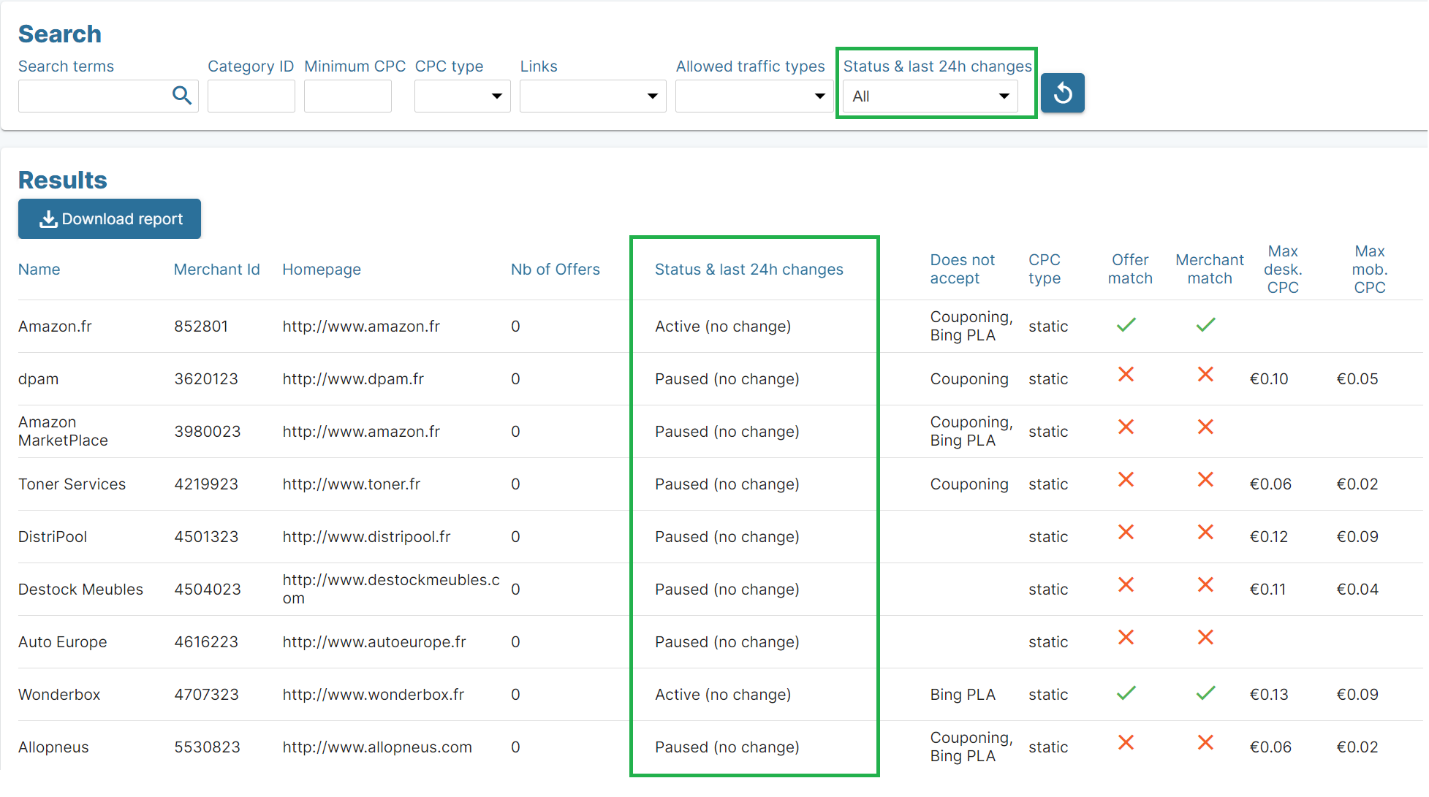
Merchant Directory
The Merchant Directory in your Publisher Center account features a status field whose values indicate the current status of the merchant campaign. Additionally, it will show if the current state has changed in the last 24hours. There are four possible values for the status field.
-
Active : has been active over 24 hours
-
Active (was paused) : has been active less than 24 hours
-
Paused : has been paused over 24 hours
-
Paused (was active) : has been paused less than 24 hours
Q&A
Should I care about merchant campaign availability?
The features outlined have numerous benefits.
-
You can leverage merchant visibility features to identify merchant campaigns that have become recently active. This can increase your potential for revenue generation by highlighting merchants that you can promote.
-
Merchant campaign deactivation can impact you if you rely on caching offers or static content. In fact, the only publisher that won't see any benefit in tracking merchant campaign deactivations are publishers serving live results (not cached) from the
/search/offersendpoint. In this instance, merchant status is up to date in the endpoint's response.
What happens if I don't track merchant campaign status?
When a merchant becomes inactive for whatever reason, you will no longer be able to monetize this merchant campaign.
-
If you are serving offers to users and a user clicks on an offer from a merchant that is inactive, the user will see a 404 error page. This click will not be monetized.
-
If you are serving Links to users and a user clicks on a Links from a merchant that is inactive, the user will be redirected to the input URL. This click will not be monetized.