
Important
-
This Server-to-Server implementation is only intended as a complementary method to increase tracking coverage to the Installation via Google Tag Manager (GTM) and Manual installation for Kelkoo Sales Tracking
-
We don't provide custom implementation and a very limited technical support for this implementation.
-
You need to track inbound traffic directly from Kelkoo Group Network, as well as parallel tracking calls when the url contains gclid id from Google or msclkid from Bing
-
You need to make sure all sales are tracked, in-session as well as those made on a different session than the initial click.
Before you begin
You'll need your Merchant ID/comId, see How To get your merchantId.
Running several campaigns or in several countries? If you run several campaigns with Kelkoo, you only need to send any of the Merchant IDs (comId) available. Kelkoo matches each sale to the right campaign regardless of which Merchant ID you send, so nothing is missed by using just one.
If you operate more than one website, pass the Merchant ID (comId) that belongs to whichever website the sale actually happened on. acme.com and acme.fr are the same website for Kelkoo; acme.com and safe.com are two different websites.
Global view
-
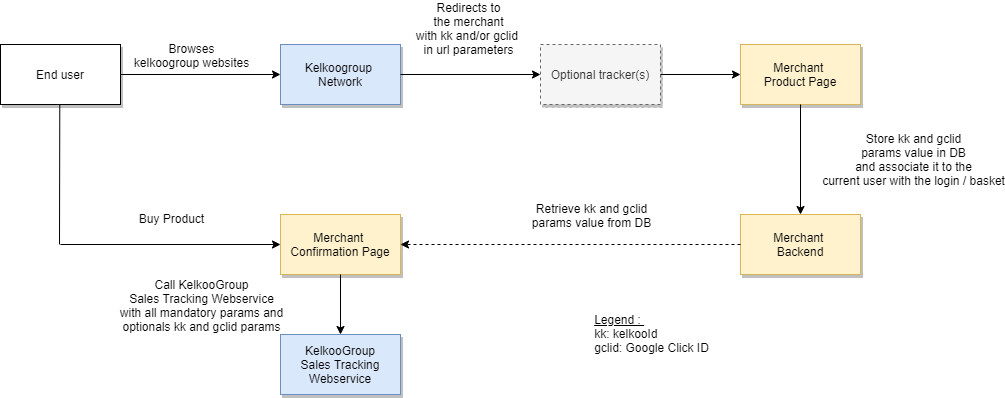
End user browses Kelkoo Group websites or Kelkoo Group’s partners' shopping services and, when clicking an offer on Kelkoo Group Network, is then redirected to the merchant website.
-
KelkooId (kk) and Google Click Id (gclid) are passed as query parameters of the url
-
When the user reaches one of your Product page, your website stores kk and gclid id in a table on your website's backend, and associate it to the current user via the login/basket
|
basket |
login |
kk |
gclid |
|---|---|---|---|
|
17e8b1bxx7r17420 |
1233443 |
a4csscc-1781b717420-34cf3 |
EAIaIQobChMIpNXu6r6D6AIVQsjeCh27SQXcEAkYAyABEgIhz_D_BwE |
|
... |
... |
... |
... |
-
When the user buys the product and reaches your Confirmation Page, your Website retrieves kk and gclid params value from database and calls the Kelkoo Group Sales Tracking Webservice on https://s.kelkoogroup.net/st for each sale with an HTTP GET with the following query parameters:
|
name |
type |
mandatory |
description |
example |
|---|---|---|---|---|
|
orderId |
String |
true |
A unique order identifier |
FAPC-MZL8-QFNY |
|
comId |
Long |
true |
The unique ID representing your shop within the Kelkoo Group system (your Merchant ID) |
100503562 |
|
orderValue |
Double |
true |
The total amount of the order |
37.72 |
|
productsInfos |
String |
true |
A UrlEncoded Base64 of a Json Array of the products in the basket. See note below the table. |
|
|
saleId |
Double |
true |
A randomly generated number between 0 and 1 |
0.24603935101497432 |
|
kelkooId |
String |
false |
The value of the kk parameter in the url of your landing page |
a4c6224-1700767fb9f-c3de3 |
|
gclid |
String |
false |
The value of the gclid parameter in the url of your landing page |
EAIaIQobChMIpNXu6r6D6AIVQsjeCh27SQXcEAkYAyABEgIhz_D_BwE |
|
msclkid |
String |
false |
The value of the msclkid parameter in the url of your landing page |
751ff8c7d3bf17f6f6729c640c4249d5 |
|
returningUser |
Boolean |
false |
"true" if the sale is done by a returning user, "false" for a new user |
true |
|
coupon |
String |
false |
The coupon/promo code used for the order, if any |
SUMMER10 |
|
currency |
String |
false |
The ISO 4217 currency code of the order |
EUR |
|
vatAmount |
Double |
false |
The total VAT / tax amount of the order |
20.50 |
|
shippingCost |
Double |
false |
The total shipping cost of the order |
4.99 |
|
affiliation |
String |
false |
The store or affiliation associated with the order, if applicable |
Acme Online Store |
|
discountAmount |
Double |
false |
The total discount amount applied to the order |
7.50 |
|
paymentStatus |
String |
false |
The payment status of the order |
paid |
|
customerLifetimeValue |
Double |
false |
The lifetime value of the customer who placed the order |
1250.50 |
|
source |
String |
false |
Set this param value to "serverToServer" |
serverToServer |
None of the fields below saleId are required for a sale to be tracked, but we strongly encourage you to populate as many as you can — see Why these optional fields matter for what each one is used for.
The value actually sent in the productsInfos parameter is the JSON array above, Base64-encoded (URL-safe) and then URL-encoded — see the code examples in Enhanced Code Implementation below for how to produce it programmatically. Always use the canonical field names productname, productid, quantity, and price — see Add Basket Information to Kelkoo Sales Tracking for the full basket format and why alternative field names (such as id instead of productid) are not reliable for baskets with more than one product.
GDPR & consent considerations
Because Server-to-Server calls are made directly from your backend, they bypass the browser-based cookie-consent mechanism used by the standard Lead Tag / Conversion Tag installation.
Storing kk, gclid, or msclkid identifiers in your own database is data collection you control, and is not covered by the standard Lead Tag's consent mechanism since you are not using it. You are responsible for implementing your own consent-aware logic before storing these identifiers, in line with GDPR, ePrivacy, or your applicable local regulation — see Configuring Consent Management (CMP) for practical guidance.
For the full legal and compliance details (cookie list, data retention, data controller information), see the GDPR Notice for Kelkoo Sales Tracking
What exactly do you need to implement ?
-
Add parameters into the merchant landing page urls if you use an external tracking service (such as Lengow). For example, Lengow short urls are not compatible.
-
Store kelkooId / Google Click Id in database whenever a page is visited and associate it with the current user with login and basket
-
In order to add the domain, for best practice, add in the request header of the call : "Referer: https://yourwebsite.com"
-
Retrieve the KelkooId and Google Click Id from the database when Confirmation Page is displayed, and call the Kelkoo Sales Tracking Webservice
-
Implement consent management appropriate for your jurisdiction before storing click identifiers — see GDPR & consent considerations above and Configuring Consent Management (CMP) .
Enhanced Code Implementation:
The examples below use the mandatory parameters only, plus the identifiers needed to call the webservice. Add the optional fields from the table above the same way, following the pattern used for the mandatory ones.
Those examples are for reference only. Don’t copy paste them without making sure they work in your environment.
Languages
PHP
Store trackingids
<?php
// Store Kelkoo, Google, and Microsoft click IDs for a user.
function storeIdsInDatabase($userId, $kelkooId, $googleClickId, $msclkid) {
    global $db; // Existing mysqli database connection

    // Prepared statements handle null values without calling
    // mysqli_real_escape_string(null), which is deprecated in PHP 8.1+.
    $query = "
        INSERT INTO user_tracking
            (user_id, kelkoo_id, google_click_id, ms_clk_id)
        VALUES (?, ?, ?, ?)
        ON DUPLICATE KEY UPDATE
            kelkoo_id = COALESCE(?, kelkoo_id),
            google_click_id = COALESCE(?, google_click_id),
            ms_clk_id = COALESCE(?, ms_clk_id)
    ";

    $stmt = $db->prepare($query);
    $stmt->bind_param(
        'issssss',
        $userId,
        $kelkooId,
        $googleClickId,
        $msclkid,
        $kelkooId,
        $googleClickId,
        $msclkid
    );
    $stmt->execute();
    $stmt->close();
}

session_start();

$userId = $_SESSION['user_id'] ?? null;
$kelkooId = $_GET['kk'] ?? null;
$googleClickId = $_GET['gclid'] ?? null;
$msclkid = $_GET['msclkid'] ?? null;

// Reject array parameters such as ?gclid[]=value.
foreach ([$kelkooId, $googleClickId, $msclkid] as $value) {
    if ($value !== null && !is_string($value)) {
        return;
    }
}

// A missing ID stays null. The database update preserves its existing value
// instead of replacing it with an empty string.
if (
    $userId !== null &&
    ($kelkooId !== null || $googleClickId !== null || $msclkid !== null)
) {
    storeIdsInDatabase($userId, $kelkooId, $googleClickId, $msclkid);
}
?>
Retrieve trackingids and send sales information to KST
<?php
function getIdsFromDatabase($userId) {
    global $db; // Existing mysqli database connection

    // Use a prepared statement for the database lookup.
    $query = "
        SELECT kelkoo_id, google_click_id, ms_clk_id
        FROM user_tracking
        WHERE user_id = ?
    ";

    $stmt = $db->prepare($query);
    $stmt->bind_param('i', $userId);
    $stmt->execute();

    $result = $stmt->get_result();
    $row = $result->fetch_assoc();

    $stmt->close();

    return $row;
}

function customBase64Encode($data) {
    return rtrim(strtr(base64_encode($data), '+/', '-_'), '=');
}

function encodeBasket($productsArray) {
    $jsonData = json_encode($productsArray, JSON_THROW_ON_ERROR);
    return customBase64Encode($jsonData);
}

function generateSaleId() {
    return mt_rand() / mt_getrandmax();
}

function callKelkooSalesTracking(
    $country,
    $comId,
    $orderId,
    $orderValue,
    $productsInfos,
    $saleId,
    $kelkooId,
    $gclid,
    $msclkid
) {
    $url = 'https://s.kelkoogroup.net/st';

    $data = array(
        'country' => $country,
        'orderId' => $orderId,
        'comId' => $comId,
        'orderValue' => $orderValue,
        'productsInfos' => $productsInfos,
        'saleId' => $saleId,
        'kelkooId' => $kelkooId,
        'gclid' => $gclid,
        'msclkid' => $msclkid,
        'source' => 'serverToServer'
    );

    $url .= '?' . http_build_query($data);

    $curl = curl_init($url);
    curl_setopt($curl, CURLOPT_HTTPHEADER, array(
        'Referer: https://yourwebsite.example'
    ));
    curl_setopt($curl, CURLOPT_RETURNTRANSFER, true);

    $response = curl_exec($curl);
    curl_close($curl);

    return $response;
}

// Example values only. Replace these with data from the completed order.
$userId = $_SESSION['user_id'] ?? null;
$country = 'fr';
$comId = 123456789; // Replace with your Kelkoo com ID.
$orderId = 'MY_ORDER_123';
$orderValue = 29.98;
$basket = array(
    array(
        'productname' => 'EXAMPLE_PRODUCT',
        'productid' => 'MY_PRODUCT_123',
        'price' => 14.99,
        'quantity' => 2
    )
);

if ($userId !== null) {
    $ids = getIdsFromDatabase($userId);

    if (
        $ids !== null &&
        (
            !empty($ids['kelkoo_id']) ||
            !empty($ids['google_click_id']) ||
            !empty($ids['ms_clk_id'])
        )
    ) {
        callKelkooSalesTracking(
            $country,
            $comId,
            $orderId,
            $orderValue,
            encodeBasket($basket),
            generateSaleId(),
            $ids['kelkoo_id'],
            $ids['google_click_id'],
            $ids['ms_clk_id']
        );
    }
}
?>
Java
Store trackingids
import jakarta.servlet.Filter;
import jakarta.servlet.FilterChain;
import jakarta.servlet.ServletException;
import jakarta.servlet.ServletRequest;
import jakarta.servlet.ServletResponse;
import jakarta.servlet.annotation.WebFilter;
import jakarta.servlet.http.HttpServletRequest;
import jakarta.servlet.http.HttpSession;

import java.io.IOException;
import java.sql.Connection;
import java.sql.DriverManager;
import java.sql.PreparedStatement;
import java.sql.SQLException;

@WebFilter("/*")
public class TrackingFilter implements Filter {

    @Override
    public void doFilter(
            ServletRequest request,
            ServletResponse response,
            FilterChain chain
    ) throws IOException, ServletException {
        HttpServletRequest httpRequest = (HttpServletRequest) request;

        String kelkooId = httpRequest.getParameter("kk");
        String googleClickId = httpRequest.getParameter("gclid");
        String msclkid = httpRequest.getParameter("msclkid");

        // Do not create a session just because a visitor opened a page.
        HttpSession session = httpRequest.getSession(false);
        Object sessionUserId = session == null
                ? null
                : session.getAttribute("user_id");

        if (sessionUserId instanceof String userId
                && !userId.isBlank()
                && (kelkooId != null
                    || googleClickId != null
                    || msclkid != null)) {
            try {
                storeIdsInDatabase(
                        userId, kelkooId, googleClickId, msclkid
                );
            } catch (SQLException e) {
                // Example only: production code needs a defined failure
                // policy and structured logging without exposing click IDs.
                throw new ServletException("Could not store tracking IDs", e);
            }
        }

        chain.doFilter(request, response);
    }

    private void storeIdsInDatabase(
            String userId,
            String kelkooId,
            String googleClickId,
            String msclkid
    ) throws SQLException {
        // Example configuration. Use an application-managed DataSource
        // and properly managed credentials in production.
        String url = "jdbc:mysql://localhost:3306/your_database";
        String user = "YOUR_DB_USERNAME";
        String password = "YOUR_DB_PASSWORD";

        // user_tracking.user_id must have a UNIQUE or PRIMARY KEY constraint.
        // A missing click ID remains SQL NULL and does not erase a stored ID.
        String query = """
                INSERT INTO user_tracking
                    (user_id, kelkoo_id, google_click_id, ms_clk_id)
                VALUES (?, ?, ?, ?)
                ON DUPLICATE KEY UPDATE
                    kelkoo_id = COALESCE(?, kelkoo_id),
                    google_click_id = COALESCE(?, google_click_id),
                    ms_clk_id = COALESCE(?, ms_clk_id)
                """;

        try (Connection connection =
                     DriverManager.getConnection(url, user, password);
             PreparedStatement statement =
                     connection.prepareStatement(query)) {
            statement.setString(1, userId);
            statement.setString(2, kelkooId);
            statement.setString(3, googleClickId);
            statement.setString(4, msclkid);
            statement.setString(5, kelkooId);
            statement.setString(6, googleClickId);
            statement.setString(7, msclkid);
            statement.executeUpdate();
        }
    }
}
Retrieve trackingids and send sales information to KST
import com.google.gson.Gson;
import jakarta.servlet.ServletException;
import jakarta.servlet.annotation.WebServlet;
import jakarta.servlet.http.HttpServlet;
import jakarta.servlet.http.HttpServletRequest;
import jakarta.servlet.http.HttpServletResponse;
import jakarta.servlet.http.HttpSession;

import java.io.IOException;
import java.math.BigDecimal;
import java.net.URI;
import java.net.URLEncoder;
import java.net.http.HttpClient;
import java.net.http.HttpRequest;
import java.net.http.HttpResponse;
import java.nio.charset.StandardCharsets;
import java.sql.Connection;
import java.sql.DriverManager;
import java.sql.PreparedStatement;
import java.sql.ResultSet;
import java.sql.SQLException;
import java.time.Duration;
import java.util.Base64;
import java.util.List;
import java.util.Map;

@WebServlet("/confirmation")
public class ConfirmationPageServlet extends HttpServlet {
    private final Gson gson = new Gson();

    private final HttpClient httpClient = HttpClient.newBuilder()
            .connectTimeout(Duration.ofSeconds(5))
            .build();

    @Override
    protected void doGet(
            HttpServletRequest request,
            HttpServletResponse response
    ) throws ServletException, IOException {
        HttpSession session = request.getSession(false);
        Object sessionUserId = session == null
                ? null
                : session.getAttribute("user_id");

        if (!(sessionUserId instanceof String userId)
                || userId.isBlank()) {
            response.sendError(HttpServletResponse.SC_UNAUTHORIZED);
            return;
        }

        // EXAMPLE ORDER DATA ONLY. Replace all values below with the
        // completed order from your trusted checkout system. A production
        // endpoint must verify the order and prevent duplicate sale events
        // when someone reloads or revisits the confirmation page.
        String country = "fr";
        int comId = 123456789; // Replace with your own Kelkoo com ID.
        String orderId = "MY_ORDER_123";
        BigDecimal orderValue = new BigDecimal("29.98");

        List<Map<String, Object>> basket = List.of(
                Map.of(
                        "productname", "EXAMPLE_PRODUCT",
                        "productid", "MY_PRODUCT_123",
                        "price", new BigDecimal("14.99"),
                        "quantity", 2
                )
        );

        try {
            TrackingIds ids = getIdsFromDatabase(userId);

            if (ids != null && ids.hasAnyId()) {
                callKelkooSalesTracking(
                        country,
                        comId,
                        orderId,
                        orderValue,
                        basket,
                        ids
                );
            }
        } catch (SQLException e) {
            // Example only: production code needs structured logging,
            // monitoring, and a defined retry or failure policy.
            throw new ServletException("Could not read tracking IDs", e);
        } catch (InterruptedException e) {
            Thread.currentThread().interrupt();
            throw new ServletException(
                    "Sales tracking request was interrupted", e
            );
        }

        response.setContentType("text/plain;charset=UTF-8");
        response.getWriter().println("Confirmation Page Displayed");
    }

    private TrackingIds getIdsFromDatabase(String userId)
            throws SQLException {
        // Example configuration. Use an application-managed DataSource
        // and properly managed credentials in production.
        String url = "jdbc:mysql://localhost:3306/your_database";
        String user = "YOUR_DB_USERNAME";
        String password = "YOUR_DB_PASSWORD";

        String query = """
                SELECT kelkoo_id, google_click_id, ms_clk_id
                FROM user_tracking
                WHERE user_id = ?
                """;

        try (Connection connection =
                     DriverManager.getConnection(url, user, password);
             PreparedStatement statement =
                     connection.prepareStatement(query)) {
            statement.setString(1, userId);

            try (ResultSet result = statement.executeQuery()) {
                if (!result.next()) {
                    return null;
                }

                return new TrackingIds(
                        result.getString("kelkoo_id"),
                        result.getString("google_click_id"),
                        result.getString("ms_clk_id")
                );
            }
        }
    }

    private String encodeBasket(List<Map<String, Object>> basket) {
        byte[] json = gson.toJson(basket)
                .getBytes(StandardCharsets.UTF_8);

        return Base64.getUrlEncoder()
                .withoutPadding()
                .encodeToString(json);
    }

    private void callKelkooSalesTracking(
            String country,
            int comId,
            String orderId,
            BigDecimal orderValue,
            List<Map<String, Object>> basket,
            TrackingIds ids
    ) throws IOException, InterruptedException {
        // URLEncoder.encode(String, String) also works on Java 8.
        // URL-encode each value once when assembling the query.
        StringBuilder url = new StringBuilder(
                "https://s.kelkoogroup.net/st?"
        );

        appendParameter(url, "country", country);
        appendParameter(url, "orderId", orderId);
        appendParameter(url, "comId", Integer.toString(comId));
        appendParameter(url, "orderValue", orderValue.toPlainString());
        appendParameter(url, "productsInfos", encodeBasket(basket));

        // Example value: confirm saleId requirements and persist any
        // required identifier with the order in a production integration.
        appendParameter(url, "saleId", Double.toString(Math.random()));

        if (ids.kelkooId() != null) {
            appendParameter(url, "kelkooId", ids.kelkooId());
        }
        if (ids.googleClickId() != null) {
            appendParameter(url, "gclid", ids.googleClickId());
        }
        if (ids.msclkid() != null) {
            appendParameter(url, "msclkid", ids.msclkid());
        }

        appendParameter(url, "source", "serverToServer");

        HttpRequest trackingRequest = HttpRequest.newBuilder()
                .uri(URI.create(url.toString()))
                .header("Referer", "https://yourwebsite.example")
                .timeout(Duration.ofSeconds(10))
                .GET()
                .build();

        HttpResponse<Void> trackingResponse = httpClient.send(
                trackingRequest,
                HttpResponse.BodyHandlers.discarding()
        );

        if (trackingResponse.statusCode() < 200
                || trackingResponse.statusCode() >= 300) {
            throw new IOException(
                    "Sales tracking returned HTTP "
                            + trackingResponse.statusCode()
            );
        }
    }

    private static void appendParameter(
            StringBuilder url,
            String name,
            String value
    ) throws IOException {
        if (url.charAt(url.length() - 1) != '?') {
            url.append('&');
        }

        url.append(URLEncoder.encode(name, "UTF-8"))
                .append('=')
                .append(URLEncoder.encode(value, "UTF-8"));
    }

    private record TrackingIds(
            String kelkooId,
            String googleClickId,
            String msclkid
    ) {
        boolean hasAnyId() {
            return kelkooId != null
                    || googleClickId != null
                    || msclkid != null;
        }
    }
}
Python (using a Flask integration as an example)
Store trackingids
import os

import mysql.connector
from flask import request, session

# Add this to your existing Flask app, after `app` has been created.
# This is an integration example, not a production-ready application.
# Configure authentication, database pooling, logging, and input limits
# according to your application's requirements.


def store_ids_in_database(user_id, kelkoo_id, google_click_id, msclkid):
    # Example connection setup. In production, use your application's
    # configured database connection or pool and managed credentials.
    connection = mysql.connector.connect(
        host=os.environ["DB_HOST"],
        user=os.environ["DB_USER"],
        password=os.environ["DB_PASSWORD"],
        database=os.environ["DB_NAME"],
    )

    try:
        with connection.cursor() as cursor:
            # user_tracking.user_id must have a UNIQUE or PRIMARY KEY
            # constraint. A missing ID remains NULL and leaves any
            # previously stored value in that column unchanged.
            cursor.execute(
                """
                INSERT INTO user_tracking
                    (user_id, kelkoo_id, google_click_id, ms_clk_id)
                VALUES (%s, %s, %s, %s)
                ON DUPLICATE KEY UPDATE
                    kelkoo_id = COALESCE(%s, kelkoo_id),
                    google_click_id = COALESCE(%s, google_click_id),
                    ms_clk_id = COALESCE(%s, ms_clk_id)
                """,
                (
                    user_id,
                    kelkoo_id,
                    google_click_id,
                    msclkid,
                    kelkoo_id,
                    google_click_id,
                    msclkid,
                ),
            )
        connection.commit()
    finally:
        connection.close()


@app.before_request
def capture_tracking_ids():
    # Use the ID established by your existing login flow.
    user_id = session.get("user_id")
    if user_id is None:
        return

    kelkoo_id = request.args.get("kk")
    google_click_id = request.args.get("gclid")
    msclkid = request.args.get("msclkid")

    if all(value is None for value in
           (kelkoo_id, google_click_id, msclkid)):
        return

    # Example validation. Set appropriate length and format rules for
    # the click IDs accepted by your application.
    if any(
        value is not None and len(value) > 512
        for value in (kelkoo_id, google_click_id, msclkid)
    ):
        return

    store_ids_in_database(
        user_id,
        kelkoo_id,
        google_click_id,
        msclkid,
    )
Retrieve trackingids and send sales information to KST
import base64
import json
import os
import urllib.parse
import urllib.request
from decimal import Decimal

import mysql.connector


def get_ids_from_database(user_id):
    # Example connection setup. In production, use your application's
    # configured database connection or pool and managed credentials.
    connection = mysql.connector.connect(
        host=os.environ["DB_HOST"],
        user=os.environ["DB_USER"],
        password=os.environ["DB_PASSWORD"],
        database=os.environ["DB_NAME"],
    )

    try:
        with connection.cursor() as cursor:
            # The parameter is bound by the driver, not inserted into SQL.
            cursor.execute(
                """
                SELECT kelkoo_id, google_click_id, ms_clk_id
                FROM user_tracking
                WHERE user_id = %s
                """,
                (user_id,),
            )
            return cursor.fetchone()
    finally:
        connection.close()


def encode_basket(products):
    json_bytes = json.dumps(
        products,
        ensure_ascii=False,
        separators=(",", ":"),
    ).encode("utf-8")

    # Return base64url without padding. urlencode() will encode the
    # complete query once when the tracking URL is assembled.
    return base64.urlsafe_b64encode(json_bytes).rstrip(b"=").decode("ascii")


def call_kelkoo_sales_tracking(
    country,
    com_id,
    order_id,
    order_value,
    basket,
    sale_id,
    kelkoo_id,
    gclid,
    msclkid,
):
    data = {
        "country": country,
        "orderId": order_id,
        "comId": com_id,
        "orderValue": str(order_value),
        "productsInfos": encode_basket(basket),
        "saleId": sale_id,
        "source": "serverToServer",
    }

    # Omit IDs that were not stored for this user.
    if kelkoo_id is not None:
        data["kelkooId"] = kelkoo_id
    if gclid is not None:
        data["gclid"] = gclid
    if msclkid is not None:
        data["msclkid"] = msclkid

    url = "https://s.kelkoogroup.net/st?" + urllib.parse.urlencode(data)
    request = urllib.request.Request(
        url,
        headers={"Referer": os.environ["SHOP_REFERER"]},
    )

    with urllib.request.urlopen(request, timeout=10) as response:
        return response.status


def track_completed_order(
    user_id,
    country,
    com_id,
    order_id,
    order_value,
    basket,
    sale_id,
):
    """Call from your existing checkout flow after verifying the order."""
    ids = get_ids_from_database(user_id)
    if ids is None:
        return None

    kelkoo_id, gclid, msclkid = ids
    if not any((kelkoo_id, gclid, msclkid)):
        return None

    return call_kelkoo_sales_tracking(
        country=country,
        com_id=com_id,
        order_id=order_id,
        order_value=order_value,
        basket=basket,
        sale_id=sale_id,
        kelkoo_id=kelkoo_id,
        gclid=gclid,
        msclkid=msclkid,
    )


# EXAMPLE INTEGRATION ONLY:
#
# After your checkout system verifies and records a completed order:
#
# track_completed_order(
#     user_id=authenticated_user_id,
#     country="fr",
#     com_id=YOUR_KELKOO_COM_ID,
#     order_id=completed_order.id,
#     order_value=Decimal("29.98"),
#     basket=[
#         {
#             "productname": "EXAMPLE_PRODUCT",
#             "productid": "MY_PRODUCT_123",
#             "price": 14.99,
#             "quantity": 2,
#         }
#     ],
#     sale_id=completed_order.sale_id,
# )
#
# This is an integration example, not a production-ready checkout workflow.
# The application must authenticate the user, derive values from the actual
# completed order, prevent duplicate tracking on retries or page reloads,
# and decide how to log and retry database or HTTP failures.
Node.js (Express example)
Install mysql2
npm install express express-session mysql2
trackingDatabase.js
const mysql = require('mysql2/promise');

// Sample configuration. Use your application's existing pool and
// managed credentials in production.
const db = mysql.createPool({
  host: process.env.DB_HOST,
  user: process.env.DB_USER,
  password: process.env.DB_PASSWORD,
  database: process.env.DB_NAME,
  waitForConnections: true,
  connectionLimit: 10
});

module.exports = db;
Store trackingids
const db = require('./trackingDatabase');

function readClickId(value) {
  if (value === undefined) return null;

  // Query parameters can contain arrays or objects. Reject those,
  // and set a sample size limit before storing an ID.
  if (typeof value !== 'string' || value.length > 512) {
    throw new TypeError('Invalid click ID');
  }

  return value;
}

async function storeIdsInDatabase(
  userId,
  kelkooId,
  googleClickId,
  msclkid
) {
  // user_tracking.user_id must have a UNIQUE or PRIMARY KEY constraint.
  // A missing ID is NULL, so it does not replace an existing value.
  const sql = `
    INSERT INTO user_tracking
      (user_id, kelkoo_id, google_click_id, ms_clk_id)
    VALUES (?, ?, ?, ?)
    ON DUPLICATE KEY UPDATE
      kelkoo_id = COALESCE(?, kelkoo_id),
      google_click_id = COALESCE(?, google_click_id),
      ms_clk_id = COALESCE(?, ms_clk_id)
  `;

  await db.execute(sql, [
    userId,
    kelkooId,
    googleClickId,
    msclkid,
    kelkooId,
    googleClickId,
    msclkid
  ]);
}

async function captureTrackingIds(req, res, next) {
  try {
    // Your existing login flow must set req.session.user_id.
    const userId = req.session?.user_id;
    if (userId == null) return next();

    // Express has already parsed the URL query into req.query.
    const kelkooId = readClickId(req.query.kk);
    const googleClickId = readClickId(req.query.gclid);
    const msclkid = readClickId(req.query.msclkid);

    if (
      kelkooId !== null ||
      googleClickId !== null ||
      msclkid !== null
    ) {
      await storeIdsInDatabase(
        userId,
        kelkooId,
        googleClickId,
        msclkid
      );
    }

    next();
  } catch (error) {
    next(error);
  }
}

module.exports = captureTrackingIds;

// Sample integration, not a standalone server:
//
// const captureTrackingIds = require('./captureTrackingIds');
// app.use(session(/* your existing session configuration */));
// app.use(captureTrackingIds);
// app.use(/* your existing routes */);
//
// Register this after session middleware. Production code also needs
// appropriate validation, error handling, and a plan for click IDs
// received before the visitor logs in.
Retrieve trackingids and send sales information to KST
const db = require('./trackingDatabase');

async function getIdsFromDatabase(userId) {
  const [rows] = await db.execute(
    `
      SELECT kelkoo_id, google_click_id, ms_clk_id
      FROM user_tracking
      WHERE user_id = ?
    `,
    [userId]
  );

  return rows[0] ?? null;
}

function encodeBasket(products) {
  // Base64url without padding. URLSearchParams then encodes the
  // query parameter once; do not call encodeURIComponent here.
  return Buffer.from(JSON.stringify(products), 'utf8')
    .toString('base64url');
}

async function callKelkooSalesTracking(order, ids) {
  const params = new URLSearchParams({
    country: order.country,
    orderId: String(order.id),
    comId: String(order.kelkooComId),
    orderValue: String(order.total),
    productsInfos: encodeBasket(order.trackingBasket),
    saleId: String(order.saleId),
    source: 'serverToServer'
  });

  if (ids.kelkoo_id != null) {
    params.set('kelkooId', ids.kelkoo_id);
  }
  if (ids.google_click_id != null) {
    params.set('gclid', ids.google_click_id);
  }
  if (ids.ms_clk_id != null) {
    params.set('msclkid', ids.ms_clk_id);
  }

  const url = `https://s.kelkoogroup.net/st?${params}`;

  // fetch is built into current Node.js releases. SHOP_REFERER
  // should be your shop's actual URL.
  const response = await fetch(url, {
    method: 'GET',
    headers: {
      Referer: process.env.SHOP_REFERER
    },
    signal: AbortSignal.timeout(10_000)
  });

  if (!response.ok) {
    throw new Error(
      `Kelkoo tracking returned HTTP ${response.status}`
    );
  }

  return response.status;
}

async function trackCompletedOrder(order) {
  // Call only after the application's checkout code has verified
  // and recorded the order. Do not trust order data supplied directly
  // by a browser request.
  const ids = await getIdsFromDatabase(order.userId);

  if (
    !ids ||
    (!ids.kelkoo_id &&
      !ids.google_click_id &&
      !ids.ms_clk_id)
  ) {
    return null;
  }

  return callKelkooSalesTracking(order, ids);
}

module.exports = trackCompletedOrder;

// Sample integration inside your EXISTING checkout flow:
//
// const trackCompletedOrder = require('./trackCompletedOrder');
// const completedOrder = await verifyAndRecordOrder(/* ... */);
// await trackCompletedOrder(completedOrder);
//
// Expected completedOrder fields:
// {
//   userId: authenticatedUserId,
//   country: 'fr',
//   kelkooComId: YOUR_KELKOO_COM_ID,
//   id: 'MY_ORDER_123',
//   total: '29.98',
//   saleId: stableSaleIdStoredWithOrder,
//   trackingBasket: [{
//     productname: 'EXAMPLE_PRODUCT',
//     productid: 'MY_PRODUCT_123',
//     price: 14.99,
//     quantity: 2
//   }]
// }
//
// This is sample integration code, not a production-ready checkout
// workflow. Prevent duplicate sale events, define a retry policy,
// handle database and HTTP failures, and avoid logging full URLs
// containing click IDs.